Discount
1 Module Introduction
Discount is a common and effective marketing method that incentivises customers to purchase by offering a certain percentage of discounts on items or services. It not only directly attracts price-sensitive consumers but also helps merchants clear inventory, increase sales, and enhance customer loyalty. Based on campaign goals and item types, discount promotions can take various forms such as tiered discounts, stepped discounts, and member-only discounts.
2 Configuration Guide
2.1 Basic Information Configuration
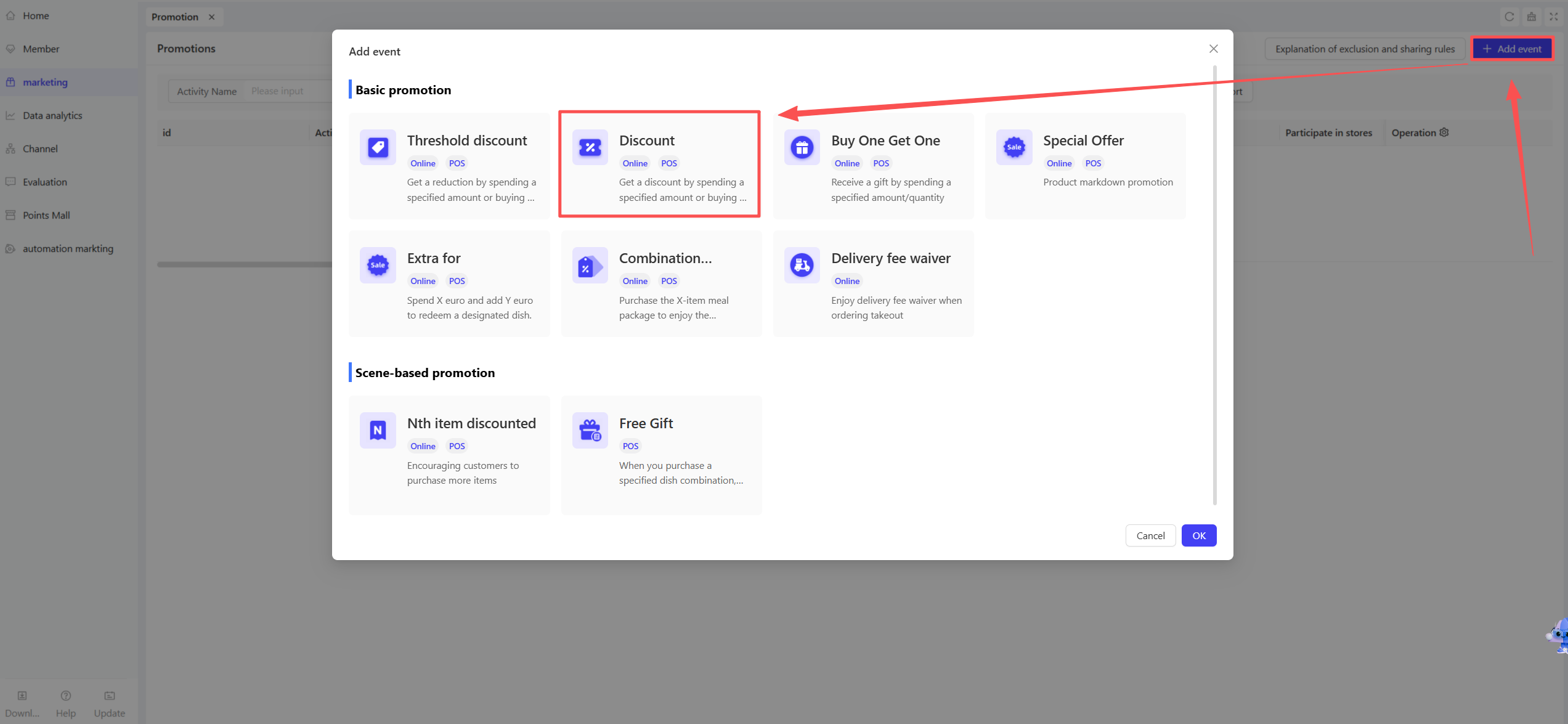
STEP 1: Access the Promotion Management Page
- Log in to the SaaS backend and navigate to【Membership Marketing】>【Marketing】> 【Promotional Activities】
- Select the “Discount” module to enter the discount promotion configuration page.
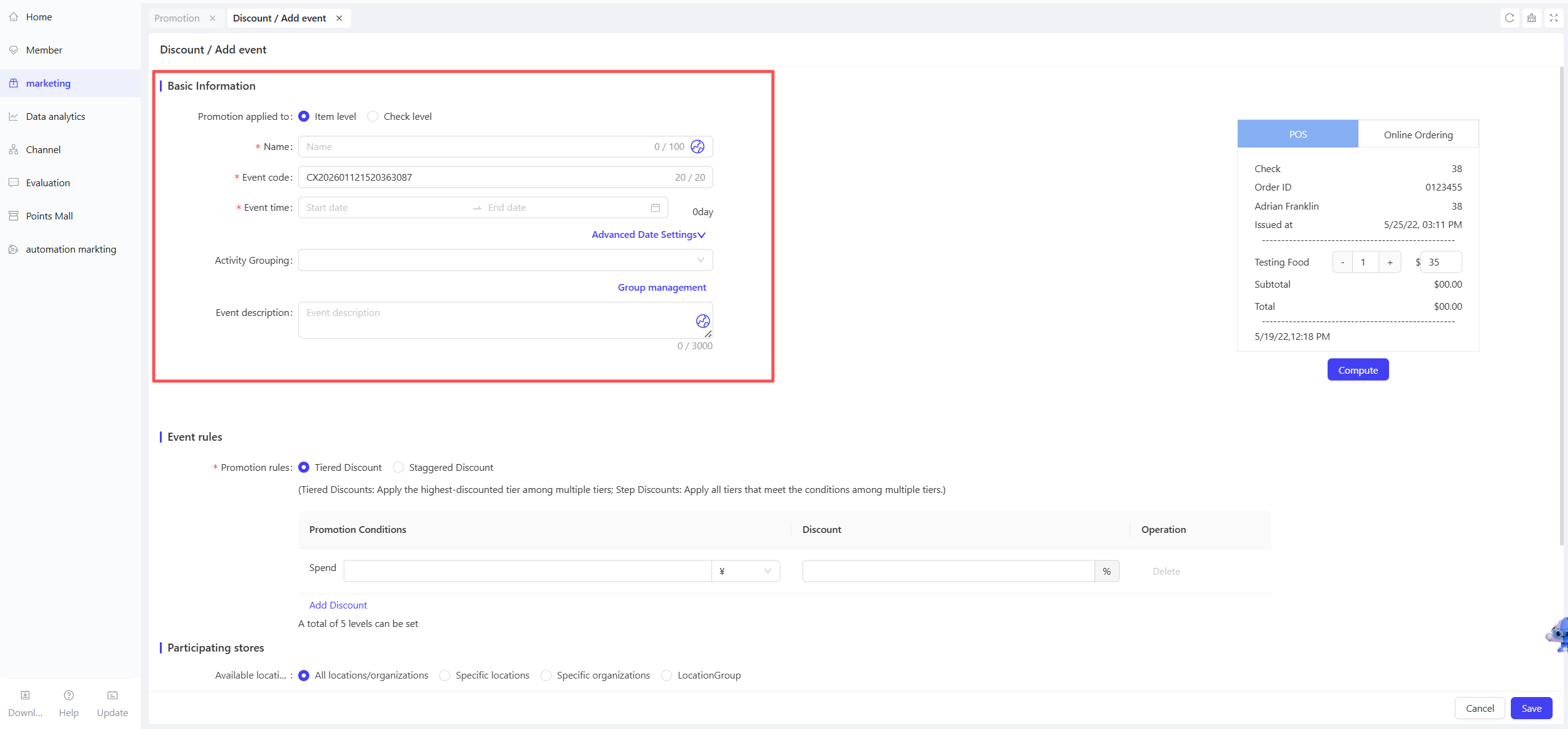
STEP 2: Fill in Basic Information
-
Name: Enter a name for easy customer identification (e.g., “20% Off Storewide”).
-
Code: Enter a unique identifier for internal management and tracking.
-
Period: Select the start and end dates for reasonable timing:
- Time Slot Restriction: Set applicable time slots (e.g., “2 PM - 5 PM daily” or “Monday to Friday”).
- Date Restriction: Specify specific dates to limit the promotion to selected days only.
-
Description: Briefly explain the activity content and rules clearly.
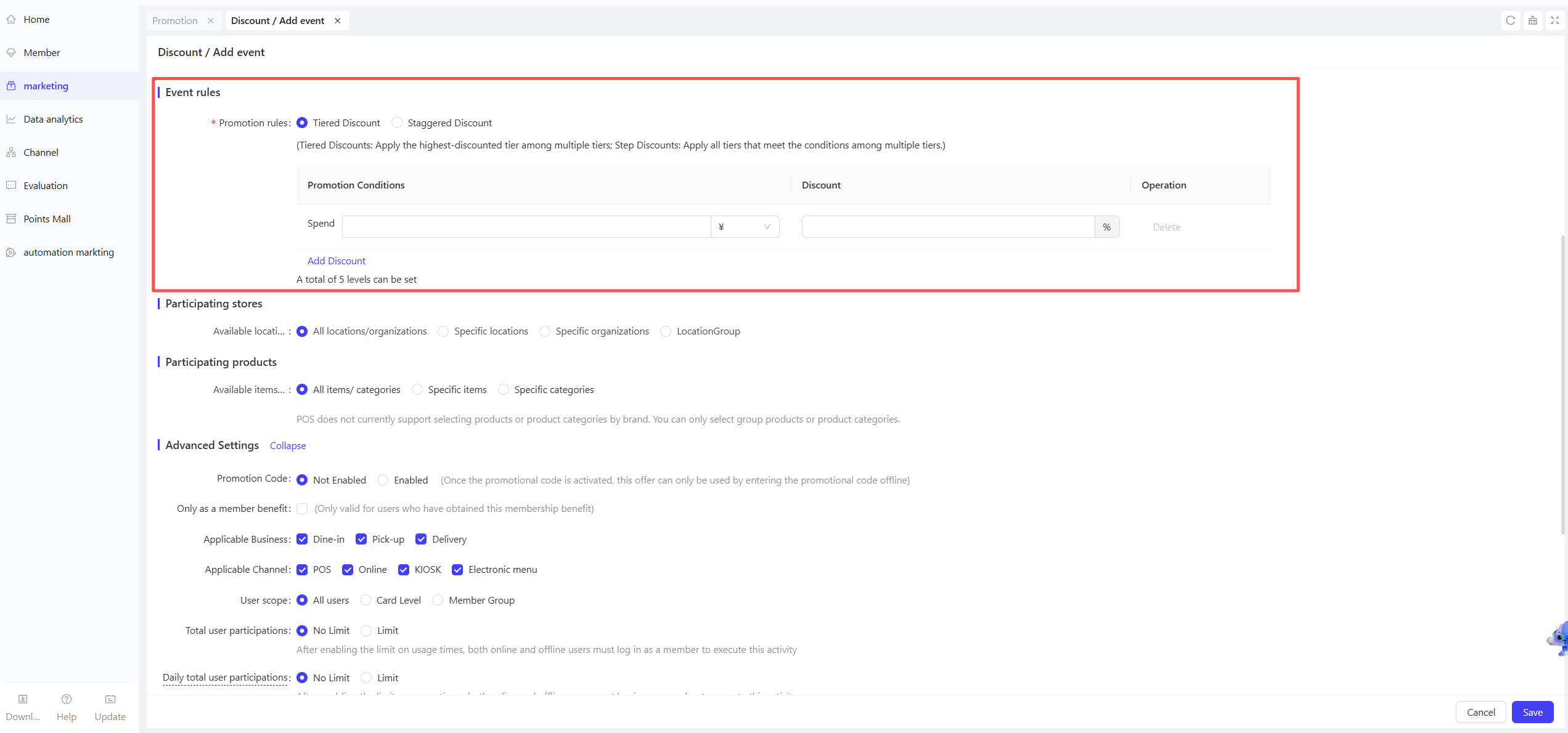
2.2 Promotion Rule Configuration
-
Tiered Discounts: Set multiple discount tiers based on order amount or item quantity. The system automatically applies to the most favourable tier. Each tier can be configured as:
- Spend X Dollars for Y% Off: The entire order gets Y% off when the order amount reaches X Dollars.
- Buy X Items for Y% Off: The entire order gets Y% off when the number of purchased items reaches X.
- Most Favourable Tier Application: If multiple tiers are eligible, the system applies the highest discount.
-
Stepped Discounts: A progressive discount method where each item enjoys a different discount based on the purchase order. Common for drinks, meal sets, etc., when buying multiple units:
- Xth Item for Y% Off: The Xth item (e.g., 2nd drink) gets a specified discount (Y%). Example: 1st item 90% off, 2nd item 80% off.
- Maximum 5 Tiers: Up to 5 discount tiers can be set (e.g., 1st to 5th items with different discounts).
-
Discount Application Order:
-
From Lowest to Highest Original Price:
- Rule Explanation: When multiple eligible items are in the order, the system prioritises applying the discount to lower-priced items first.
- Scenario Example: If a customer buys Item A ($9.00) and Item B ($5.00), the discount is applied to Item B first.
- Applicable Scenario: Ideal for merchants wanting to avoid excessive discounts on high-priced items to protect profit margins.
-
From Highest to Lowest Original Price:
- Rule Explanation: When multiple eligible items are in the order, the system prioritises applying the discount to higher-priced items first.
- Scenario Example: If a customer buys Item A ($9.00) and Item B ($5.00), the discount is applied to Item A first.
- Applicable Scenario: Suitable for merchants aiming to attract customers to purchase higher-value items.
2.3 Applicable Stores Configuration
STEP 1: Select Applicable Stores
- Choose participating stores (supports selecting all stores or specific stores by region, etc.).
STEP 2: Store-Specific Discounts (Optional)
- Set different rules for different stores to implement flexible marketing strategies.
2.4 Applicable Items Configuration
STEP 1: Select Applicable Items
- Choose participating items by category or individual item (supports all items or partial items).
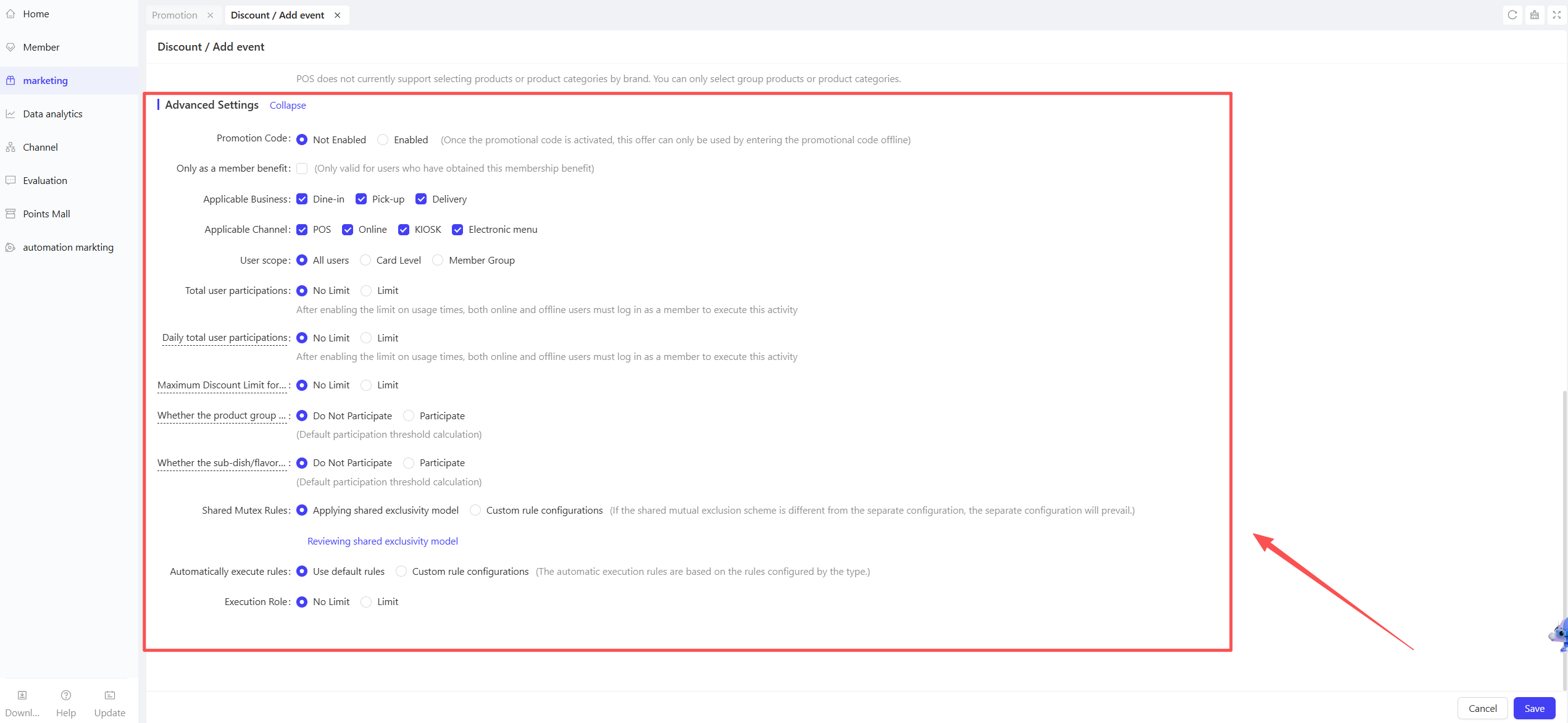
2.5 Advanced Settings
-
Participant Restrictions: Configure eligible user groups in Advanced Settings:
- Membership Tiers: Limit the promotion to specific membership levels (e.g., VIP, Silver Card members).
- User Tags: Filter users by tags (e.g., new users, returning users).
-
User Participation Limits:
- Total Participation Limit per User: Set the maximum number of times a user can participate during the promotion period (e.g., 3 times per user).
- Daily Participation Limit per User: Restrict daily participation (e.g., 1 time per day).
-
Maximum Discount per Order:
- Set the upper limit of discount amount per order. Even if the order meets multiple tiered discount conditions, the discount will not exceed this limit to avoid excessive losses.
- Example: If the maximum discount per order is set to $50, the final discount will not exceed $50 even if the order qualifies for a higher discount.
-
Whether Side Dishes Participate in Discount:
-
Threshold Calculation: Side dishes are included in the threshold calculation by default.
-
Participate: The system treats main dishes and side dishes as a whole, with the discount evenly allocated.
- Scenario Example: A merchant sets a “Spend $100 for $10 off” promotion. A customer buys Item A ($90) with a side dish ($10). The ¥10 discount is split between the main dish and the side dish.
-
Not Participate: The system only calculates the discount based on main dish prices, excluding side dishes.
- Scenario Example: A merchant sets a “Spend $100 for $10 off” promotion. A customer buys Item A ($90) with a side dish ($10). The $10 discount applies only to Item A.
- Whether Sub-dishes/Modifiers/Preparation Methods Participate in Discount:
-
Threshold Calculation: Sub-dishes/Modifiers/preparation methods are included in threshold calculation by default.
-
Participate: The system treats main dishes and sub-dishes/modifiers/preparation methods as a whole, with the discount evenly allocated.
- Scenario Example: A merchant sets a “Spend $100 for $10 off” promotion. A customer buys Item A ($90) with a sub-dish/modifiers/preparation method ($10). The $10 discount is split proportionally.
-
Not Participate: The system only calculates the discount based on main dish prices, excluding sub-dishes/modifiers/preparation methods.
- Scenario Example: A merchant sets a “Spend $100 for $10 off” promotion. A customer buys Item A ($90) with a sub-dish/modifiers/preparation method ($10). The ¥10 discount applies only to Item A.
- Sharing & Mutual Exclusion Rules:The system sets default sharing and mutual exclusion relationships for different discount types (e.g., coupons, promotions, membership prices, membership discounts). Merchants can use the default rules or configure custom rules:
- Use Default Sharing & Mutual Exclusion Plan: The system applies a universal set of rules for all discount types.
- Configure Custom Rules: Merchants can independently set sharing or mutual exclusion relationships with membership prices, membership discounts, coupons, and other promotions during creation.
- Custom configurations take precedence over the default plan in case of conflicts.
3 Activate and Manage the Promotion
3.1 Activate the Promotion
- Click【Save】after completing all configurations to activate the promotion.
3.2 Promotion Management and Monitoring
- View performance data (e.g., number of orders, discount usage) in the Promotion Management module.
- Pause, adjust, or manually archive the promotion at any time if needed.