Membership Marketing
1 How to report a loss & freeze a membership card?
1.1 Path 1: Operate under the Group Perspective
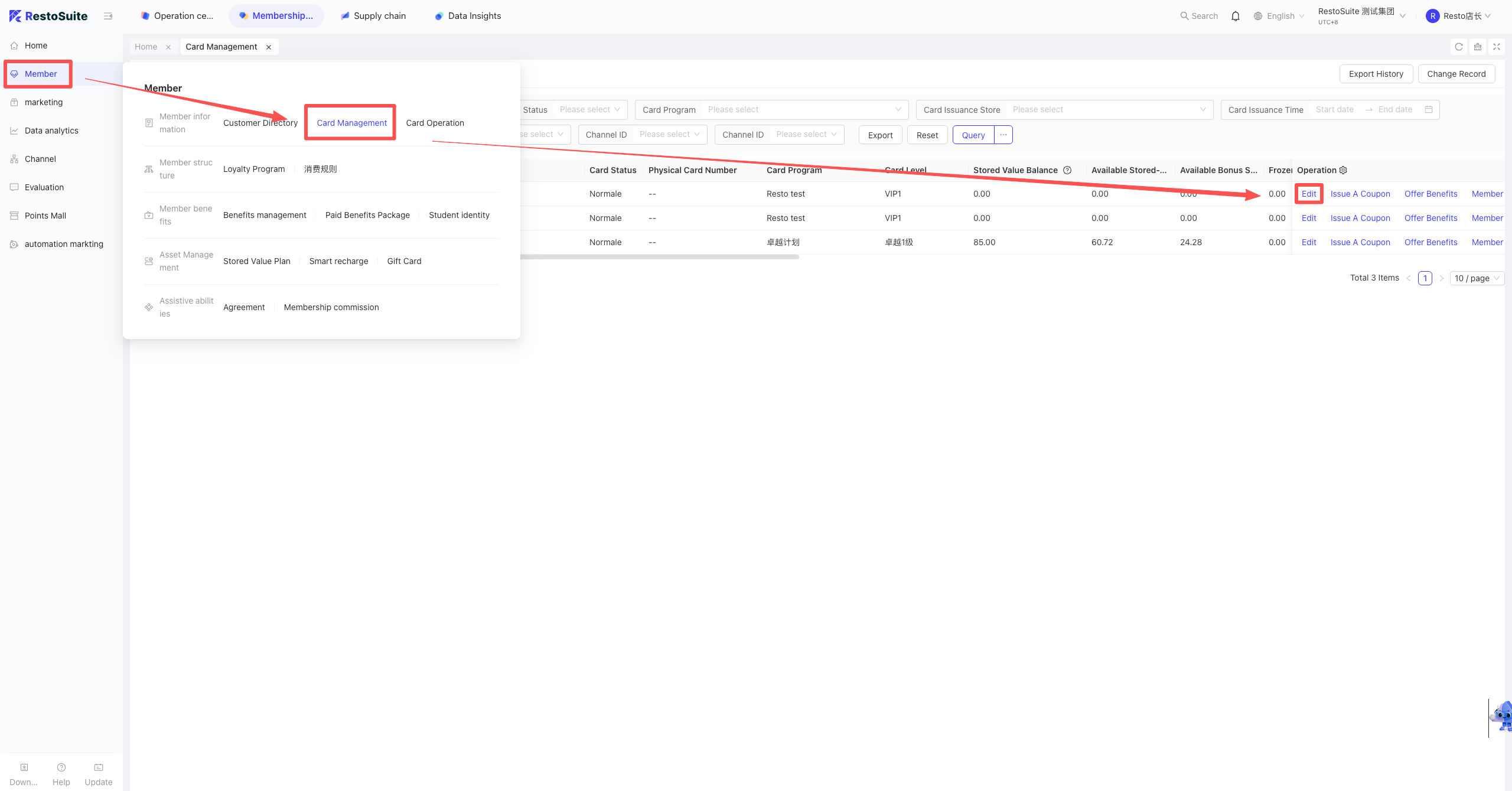
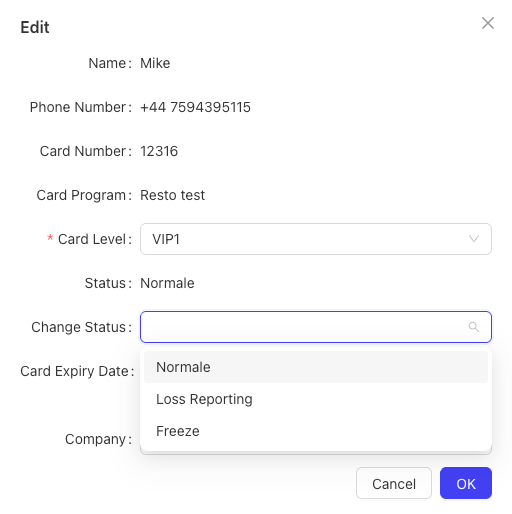
Log into the BO system, switch to the Membership Marketing module, find Member -> Card Management on the left. Find the corresponding membership card info, click Edit on the right, then select Card Status Change, and you can choose Report Loss & Freeze.
1.2 Path 2: Operate under the Brand Perspective
Log into the BO system, under the Brand perspective, select the Membership Marketing module, click Member -> Card Management on the left.
Find the corresponding membership card info, click the Edit button on the right, select Card Status Change, and you can choose Report Loss & Freeze.
1.3 Path 3: Operate under the Store Perspective
Log into the BO system, under the Store perspective, switch to the Membership Marketing module, select Member -> Card Management on the left.
Find the corresponding membership card info, click Edit -> Card Status Change, and choose Report Loss & Freeze.
2 How to cancel a membership card?
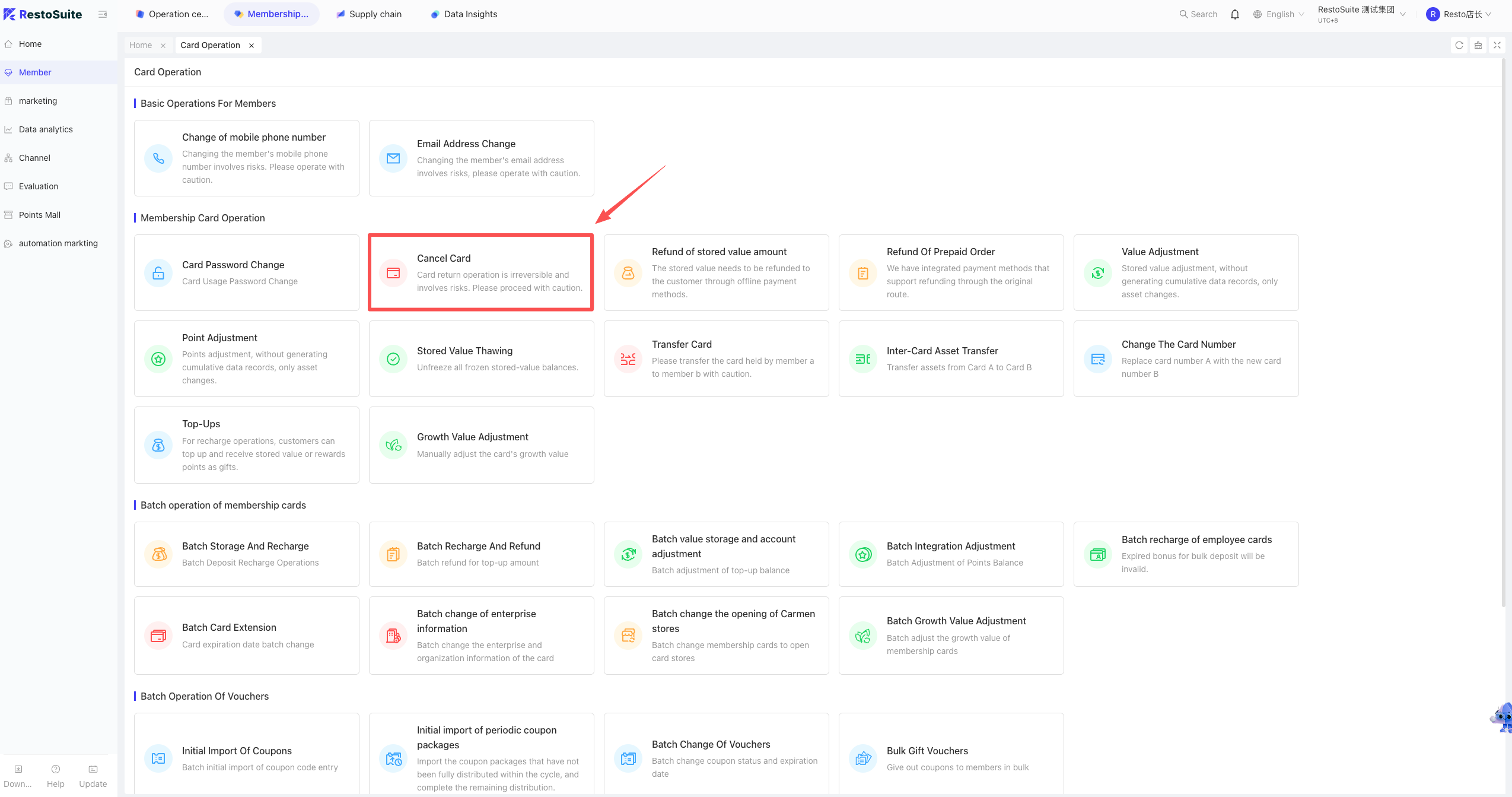
A: Membership cards cannot be canceled. The system only supports changing the card status or processing a card refund.
- Card Status Change: Please refer to “How to report a loss & freeze a membership card?”.
- Process a Card Refund:
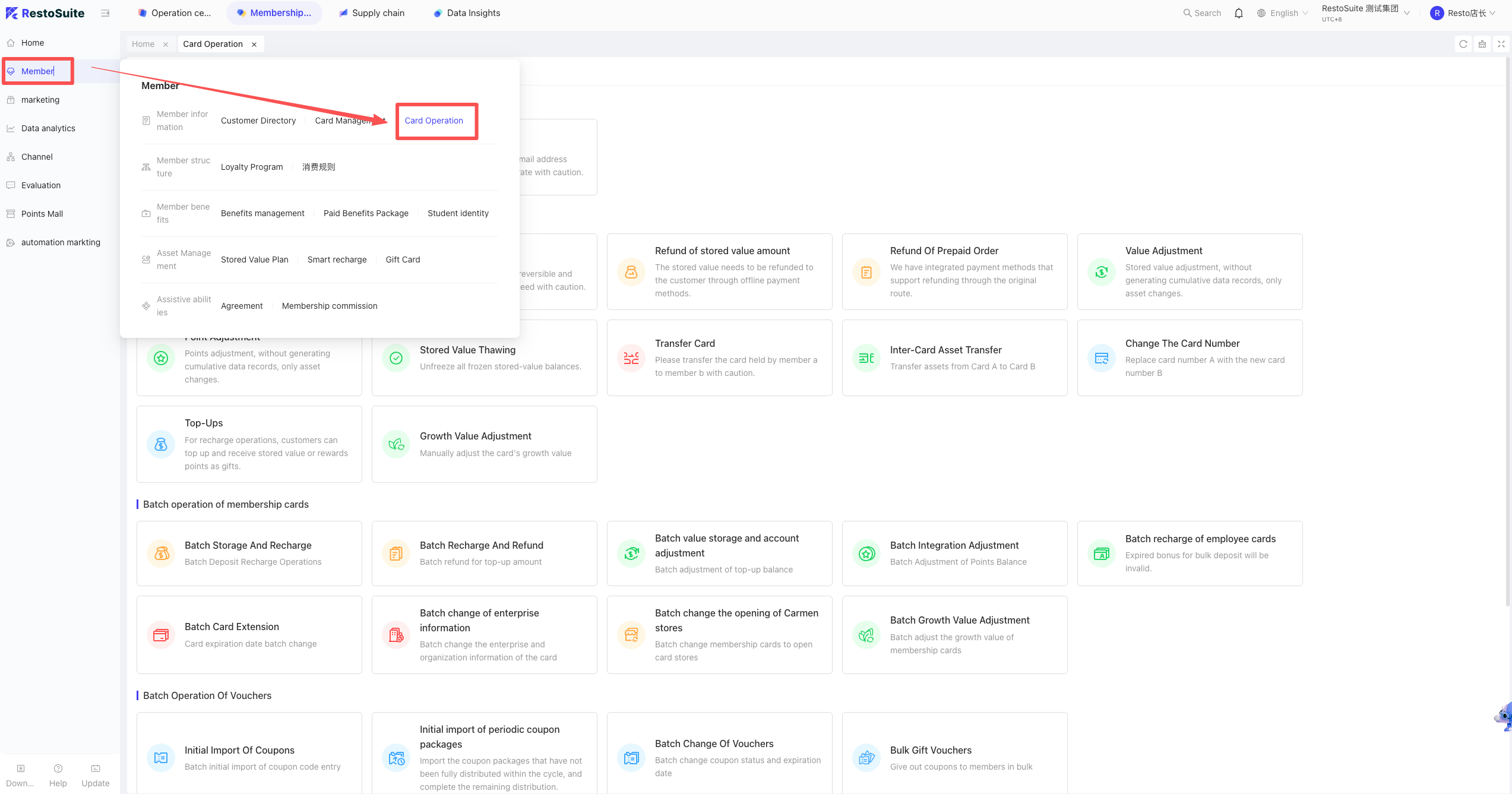
- Path 1 (Group): Log into the BO system -> Group perspective -> Membership Marketing -> Member -> Card Operations -> Card Refund. Enter the card number or phone number to query, click “View” on the corresponding card, and process the refund.
- Path 2 (Brand): Log into the BO system -> Brand perspective -> Membership Marketing -> Member -> Card Operations -> Card Refund. Enter the card number or phone number to query, click “View” on the corresponding card, and process the refund.
- Path 3 (Store): Log into the BO system -> Store perspective -> Membership Marketing -> Member -> Card Operations -> Card Refund. Enter the card number or phone number to query, click “View” on the corresponding card, and process the refund.
3 When a member joins, does the system support one person holding multiple cards?
A: When a member registers, a single phone number can only have one card under the same membership scheme. If you need to enable one person to hold multiple cards, you must create different membership schemes at the Group level.
4 How to set up a points redemption event?
Notes:
- Currently, there is no standalone “Points Redemption” event type. This is achieved using the Points Mall, which can be displayed in H5 and Mini-programs.
- The Points Mall event follows the perspective it is created in; there is no option to dispatch it or select applicable stores.
Setup Steps:
-
Create and list gifts in the Points Mall:
- Log into the BO system, under the corresponding perspective, select the Membership Marketing module. On the left, go to Marketing -> Marketing Events, click into Points Mall, and create gift information.
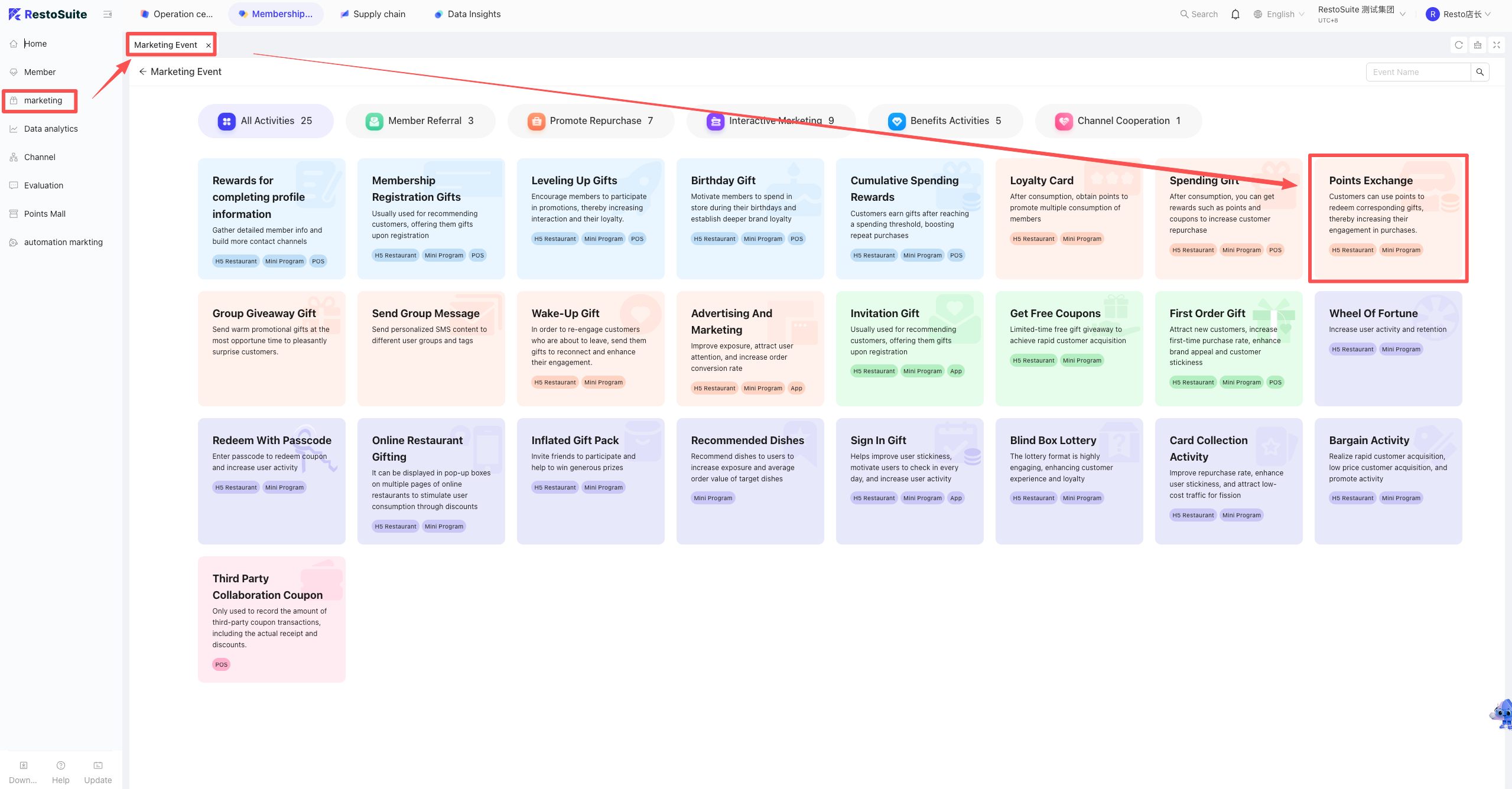
- Log into the BO system, under the corresponding perspective, select the Membership Marketing module. On the left, go to Marketing -> Marketing Events, click into Points Mall, and create gift information.
-
Bind the corresponding store in Mini-program decoration:
- Log into the BO system -> Group perspective -> Operation Center -> Online Ordering -> Website Management -> find the corresponding mini-program to bind the store information.
-
Link the Points Mall or download the QR code:
- Log into the BO system -> Group perspective -> Operation Center -> Online Ordering -> Website Management. Find the corresponding mini-program, click “Go to Decoration”, link the corresponding hotspot, and select “Points Mall”.
5 What is the consumption deduction ratio between the cash balance and the gift balance on a membership card?
A: In the membership scheme, when the top-up deduction rule is set to “deduct cash and bonus proportionately,” the calculation formula is as follows:
- Cash Balance Consumed = [Cash Balance / (Cash Balance + Bonus Balance)] * Total Consumption Amount
- Bonus Balance Consumed = [Bonus Balance / (Cash Balance + Bonus Balance)] * Total Consumption Amount
6 How to customize member consumption SMS notifications?
A: Member consumption SMS must be configured under the Group perspective.
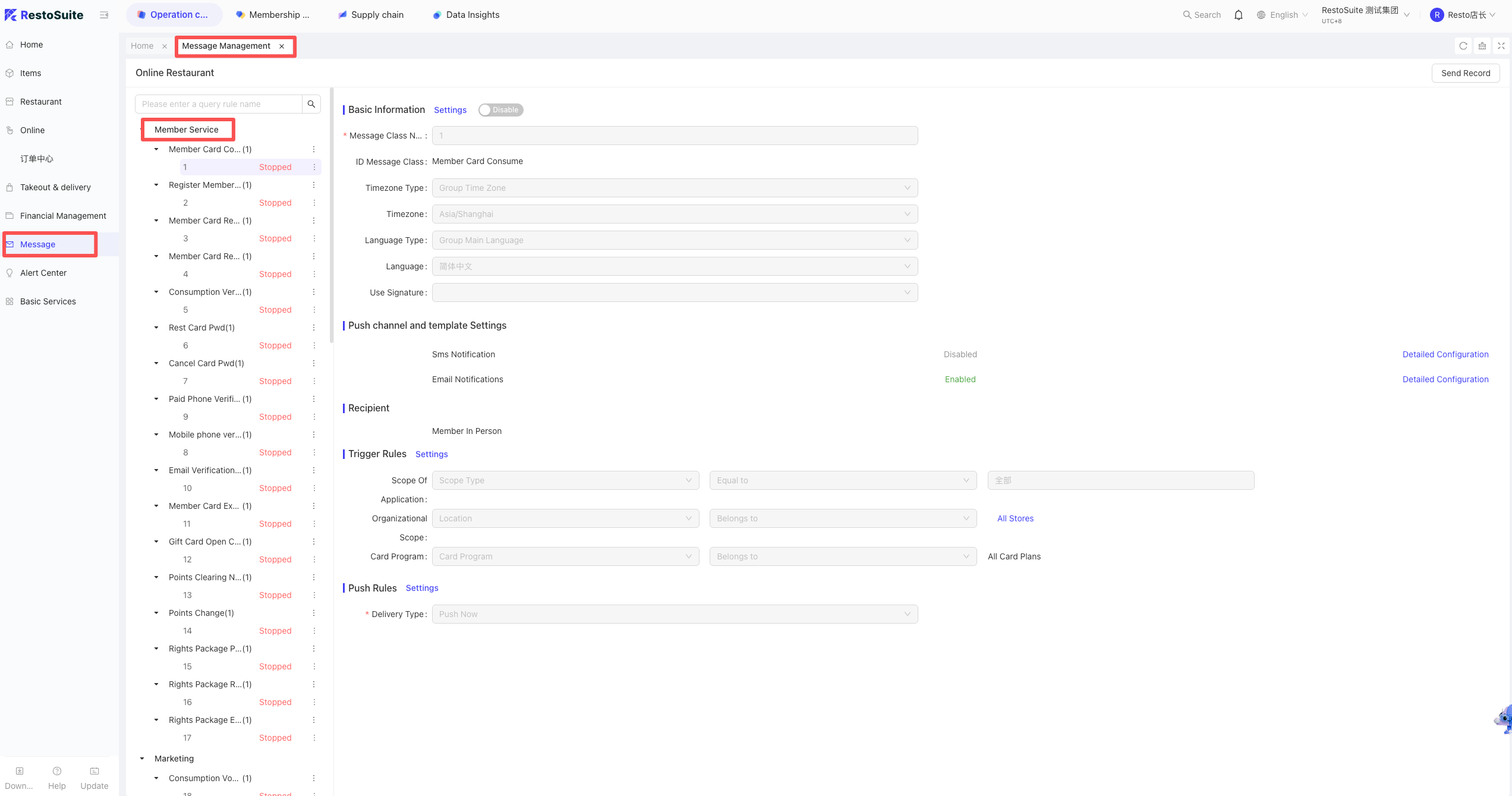
- Path: Log into the BO system -> Group perspective -> Message Center (left menu) -> Message Management. Find the corresponding member consumption type, click the three dots next to it, and create a rule.
7 How to view member SMS sending records?
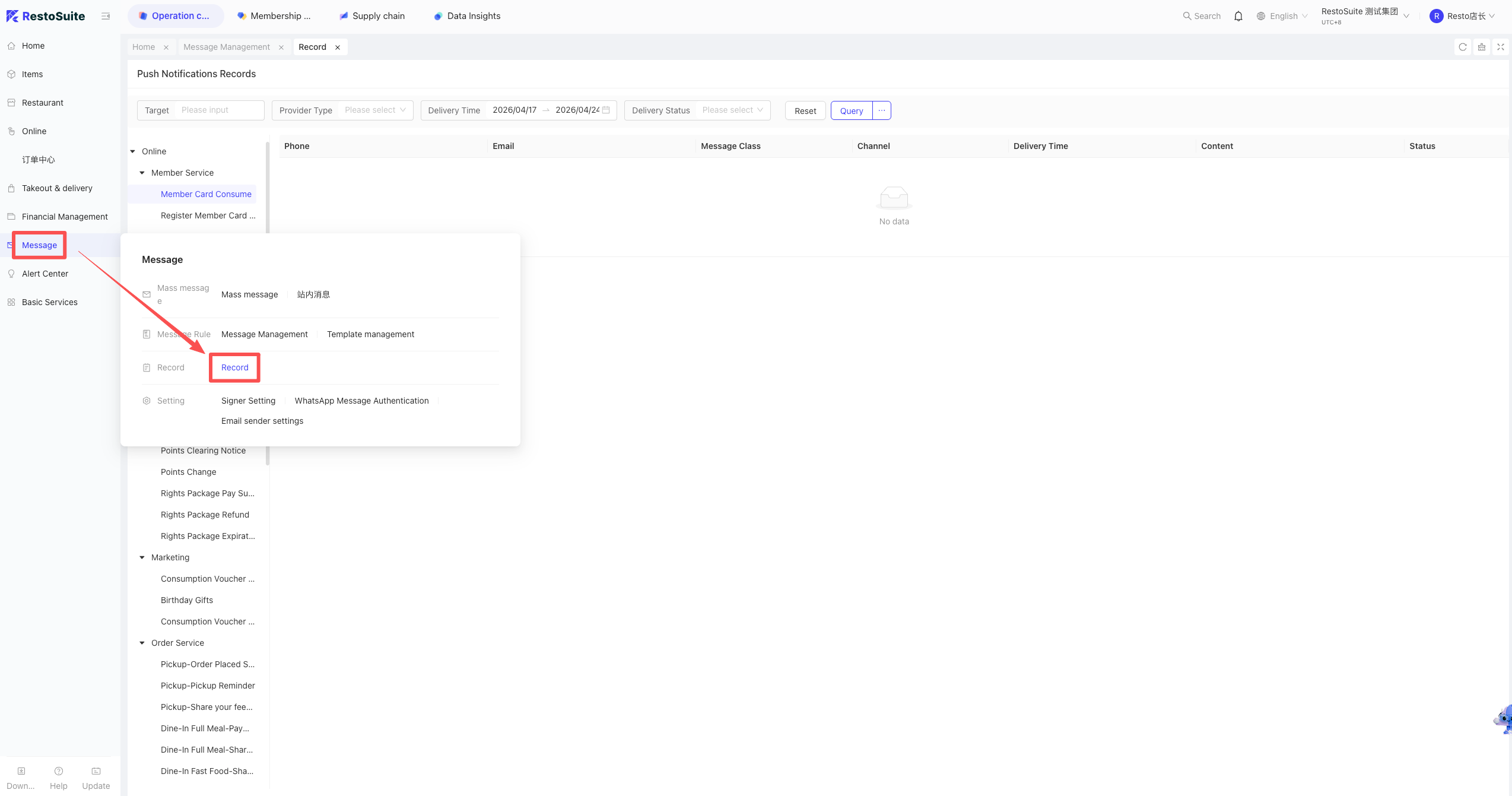
A: Log into the BO system -> Group perspective -> Operation Center -> Message Center -> Sending Records. You can view the records by filtering the corresponding message type.
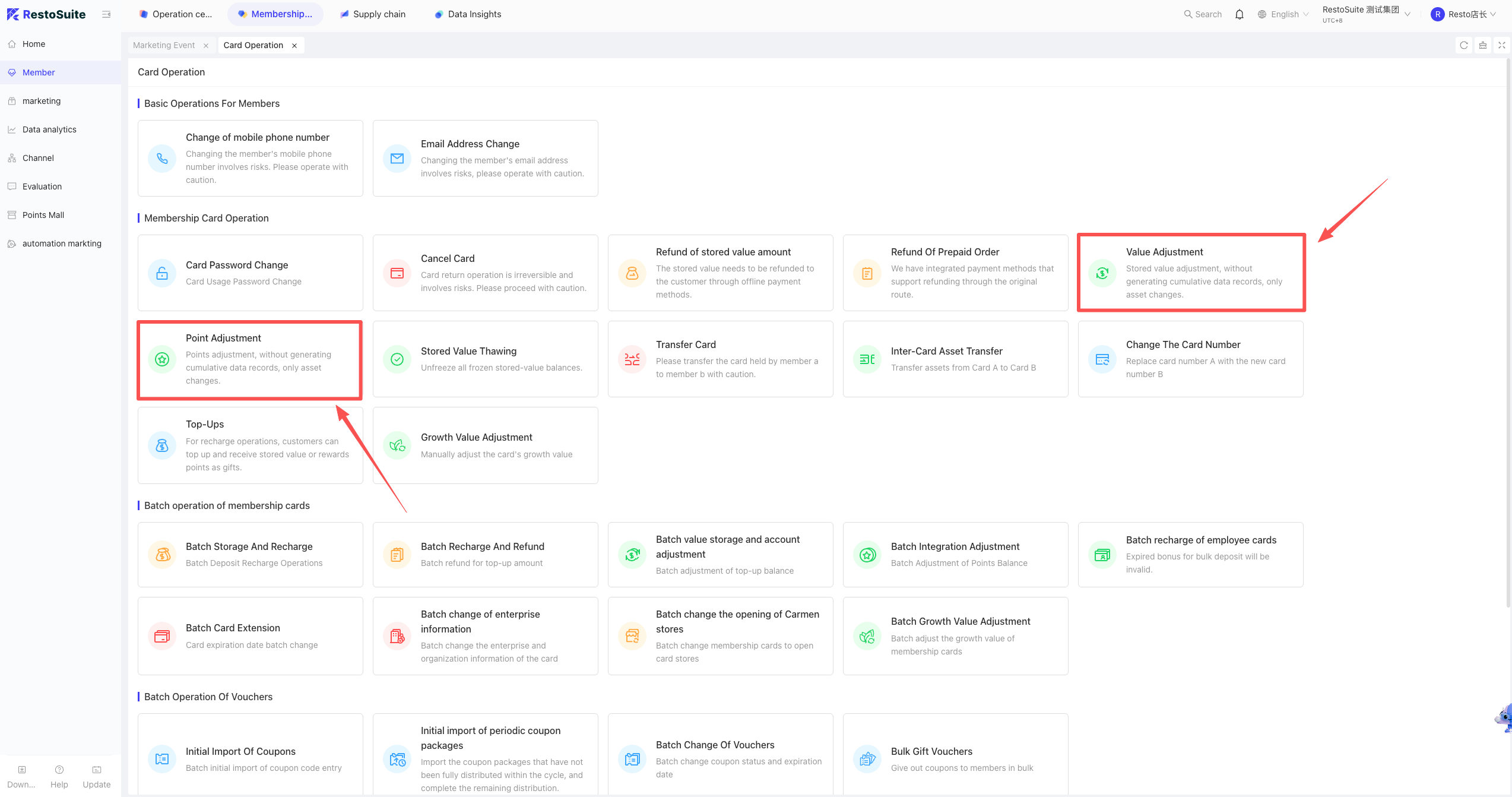
8 How to perform a balance adjustment on a membership card?
A: Balance adjustments for membership cards must be performed in the BO backend; they cannot be done on the POS front end.
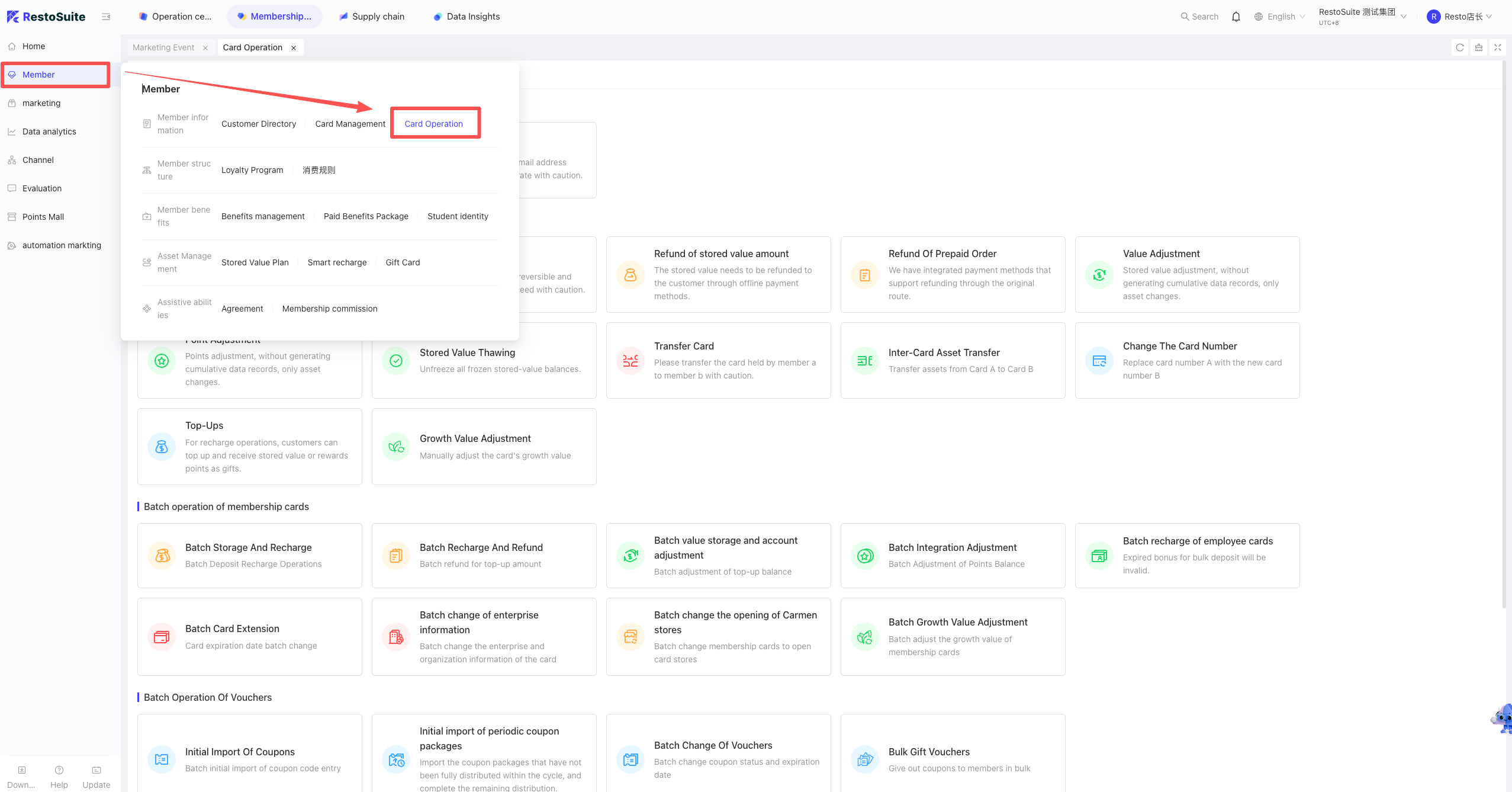
- Setup Path: Log into the BO system -> corresponding perspective -> Membership Marketing -> Member (left menu) -> Card Operations -> select Balance Adjustment or Points Adjustment.
9 Does earning points from consumption support decimals?
A: No, points from consumption only support integers.
When points accumulation is set up, if the consumption amount is less than the minimum required amount, no points will be awarded. If the consumption amount is greater than the minimum but doesn’t result in a whole point, only the integer portion of (Consumption Amount ÷ Minimum Required Amount) will be awarded.
Example: Spend $2 to earn 1 point. Spending $3 still earns 1 point.
10 How to create marketing sharing & mutually exclusive rules?
Description:
In some scenarios, merchants need certain marketing events or benefits to stack (share) or be mutually exclusive. This is achieved by creating sharing/exclusive rules. These can be created under the Group, Brand, or Store perspectives.
Setup Steps:
Log into the BO system -> corresponding perspective -> Membership Marketing -> Marketing (left menu) -> Share & Mutually Exclusive. Click New Share/Exclusive Scheme in the upper right.
- Enter the scheme name and select applicable stores. The rules use an X/Y axis matrix format. Set the rules at the intersections of the axes (e.g., setting “Member Price” to share with “Member Discount”).
11 How to create a member segment?
Description:
Member segments can be created under the Group, Brand, or Store perspectives via filtering conditions or by importing a list.
Path:
Log into the BO system -> corresponding perspective -> Membership Marketing -> Data (left menu) -> Member Segments.
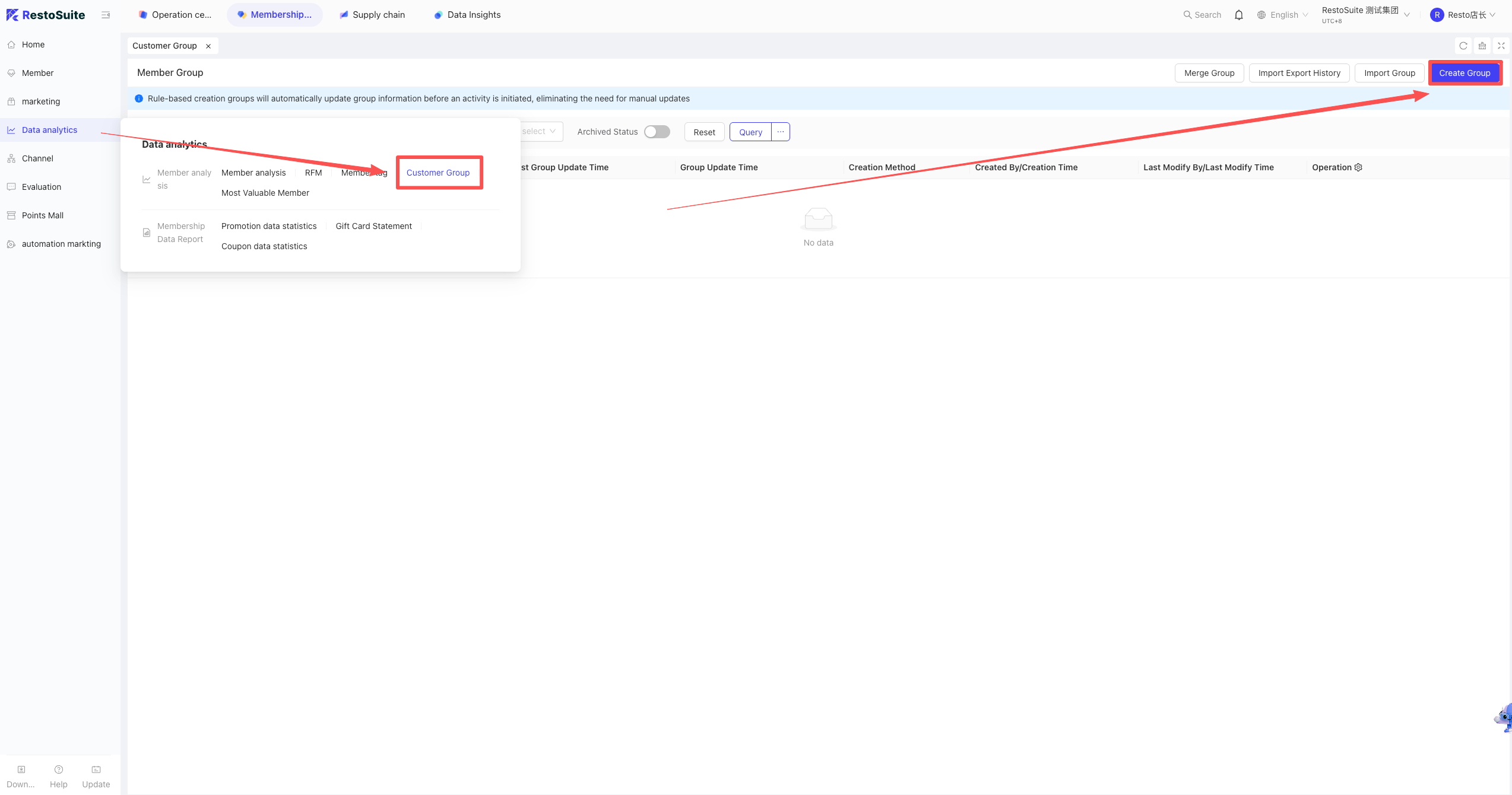
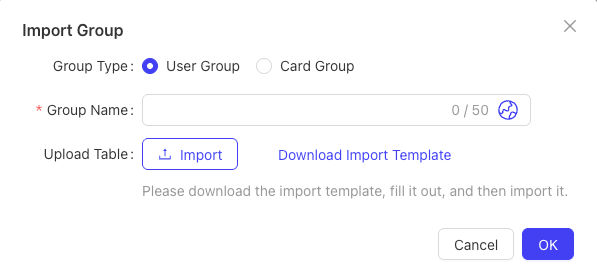
Import Segment:
Click Import Segment in the upper right. Enter the name, upload the corresponding Excel file, and click upload.

Filter & Create Manually:
Click Create Segment in the upper right. Enter the name, add filter conditions and tag limits, calculate the segment quantity, and click Confirm to create.
12 How to create a member top-up package?
Description:
To attract customers, merchants often pre-set top-up packages with benefits (e.g., Top up $1000, get $200). These can be created under the Group, Brand, or Store perspectives.
Setup Path:
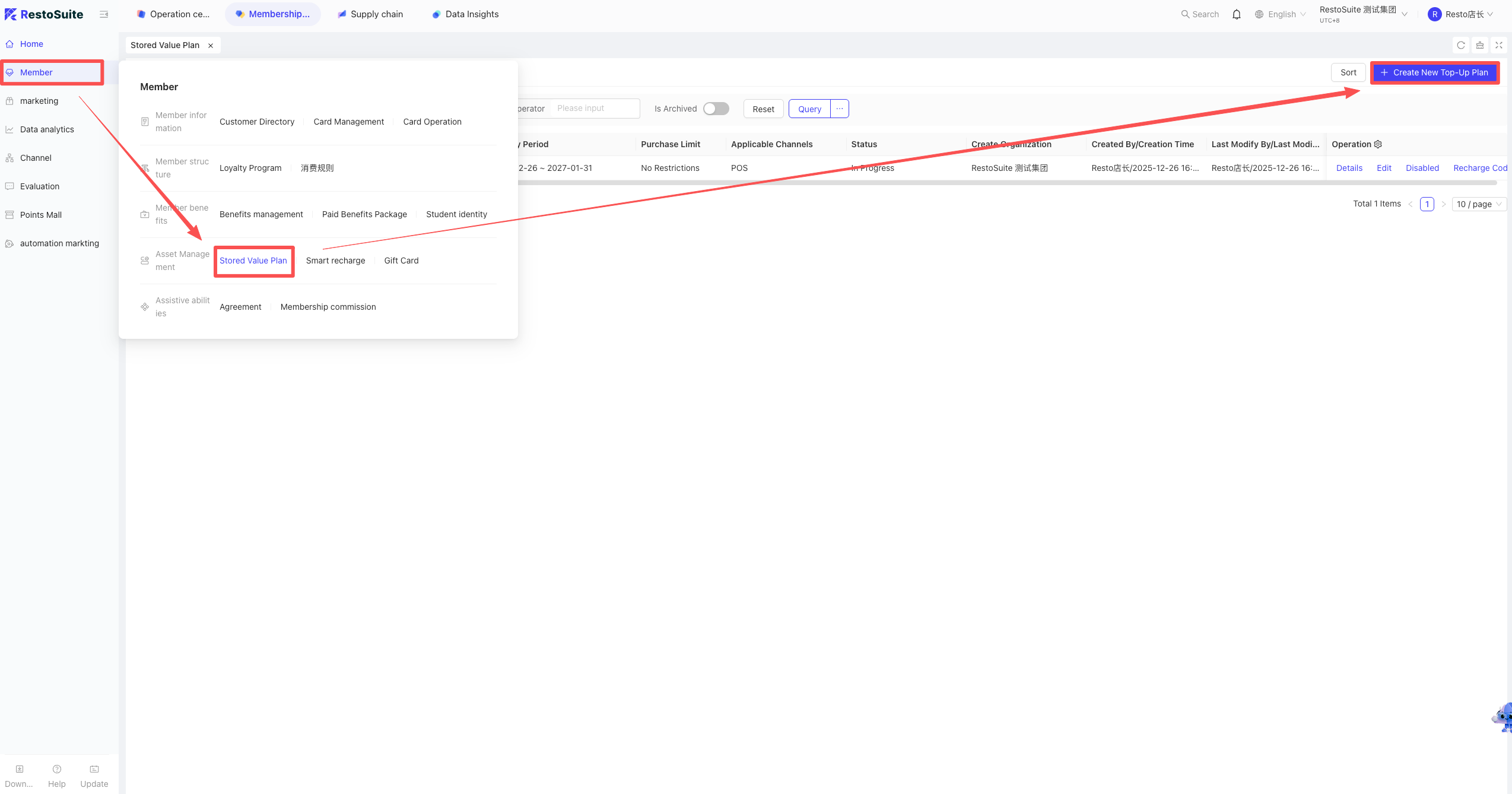
Log into the BO system -> corresponding perspective -> Membership Marketing -> Member (left menu) -> Top-up Scheme.
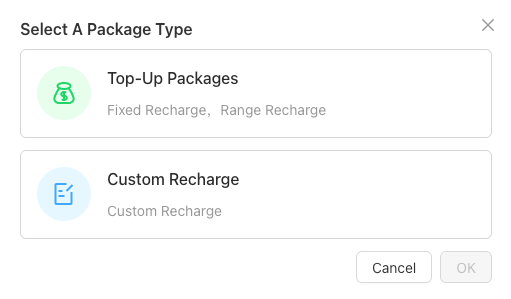
Click Top-up Scheme, then click Create Top-up Scheme in the upper right to select the type.
-
Types:
- Fixed Top-up: e.g., Top up 1000 get 200.
- Tiered Top-up: Within a certain range, a percentage of the top-up is given as a bonus.
- Custom Top-up: Set a min and max limit, allowing customers to input a custom amount.
-
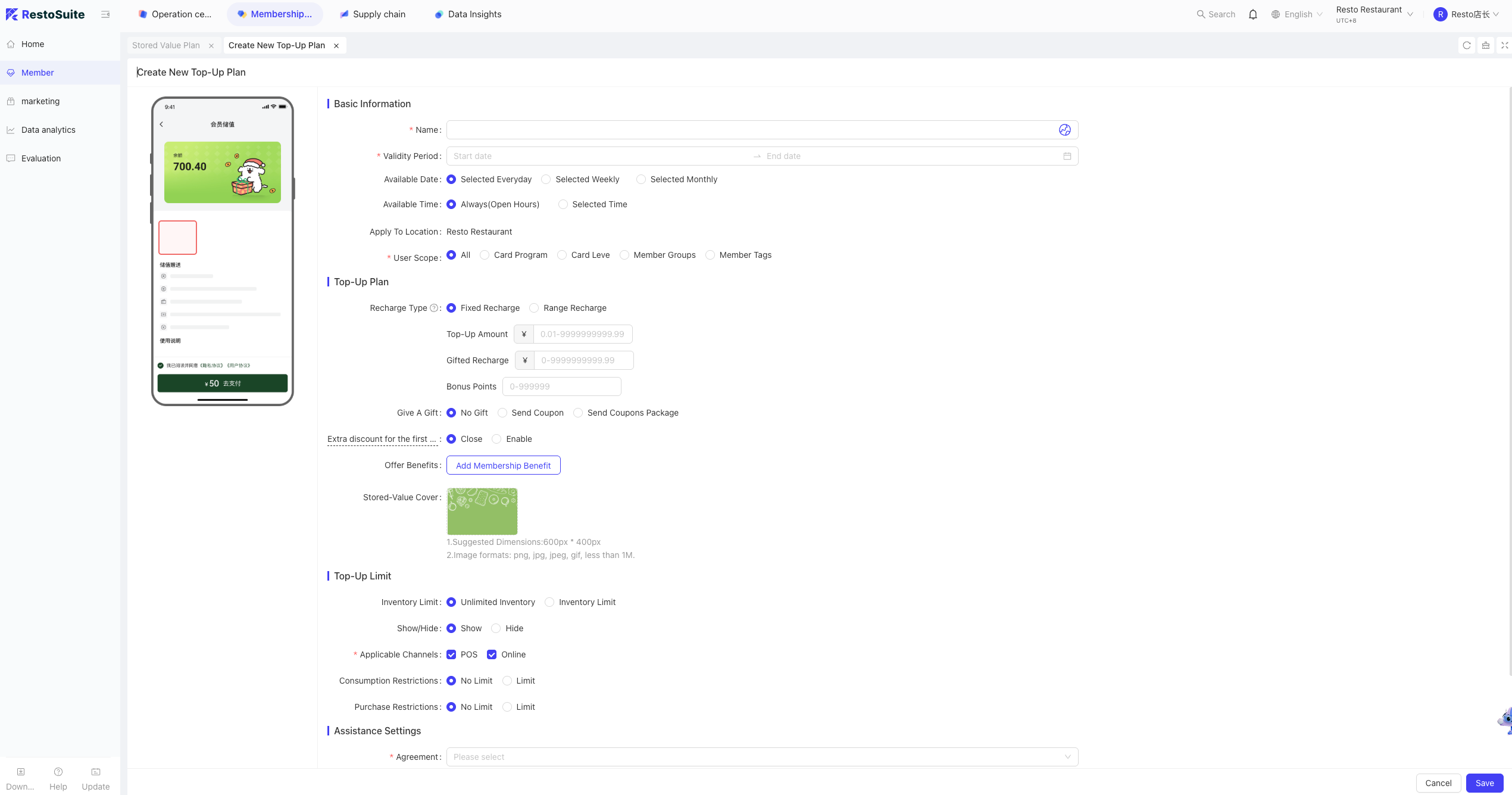
Information to Fill: Name, validity, effective date/time, gift coupons/benefits, applicable card levels, upgraded card level after purchase, applicable stores, total inventory/purchase limits, applicable channels, consumption limits (e.g., limiting same-day usage), and agreement text.
13 If the membership card balance is insufficient for the bill, can a top-up package pop up to prompt the customer?
Description:
Yes, this is called “Smart Top-up” and can be created under the Group, Brand, or Store perspectives.
Setup Path:
Log into the BO system -> corresponding perspective -> Membership Marketing -> Member -> Smart Top-up. Click Create Top-up Scheme in the upper right.
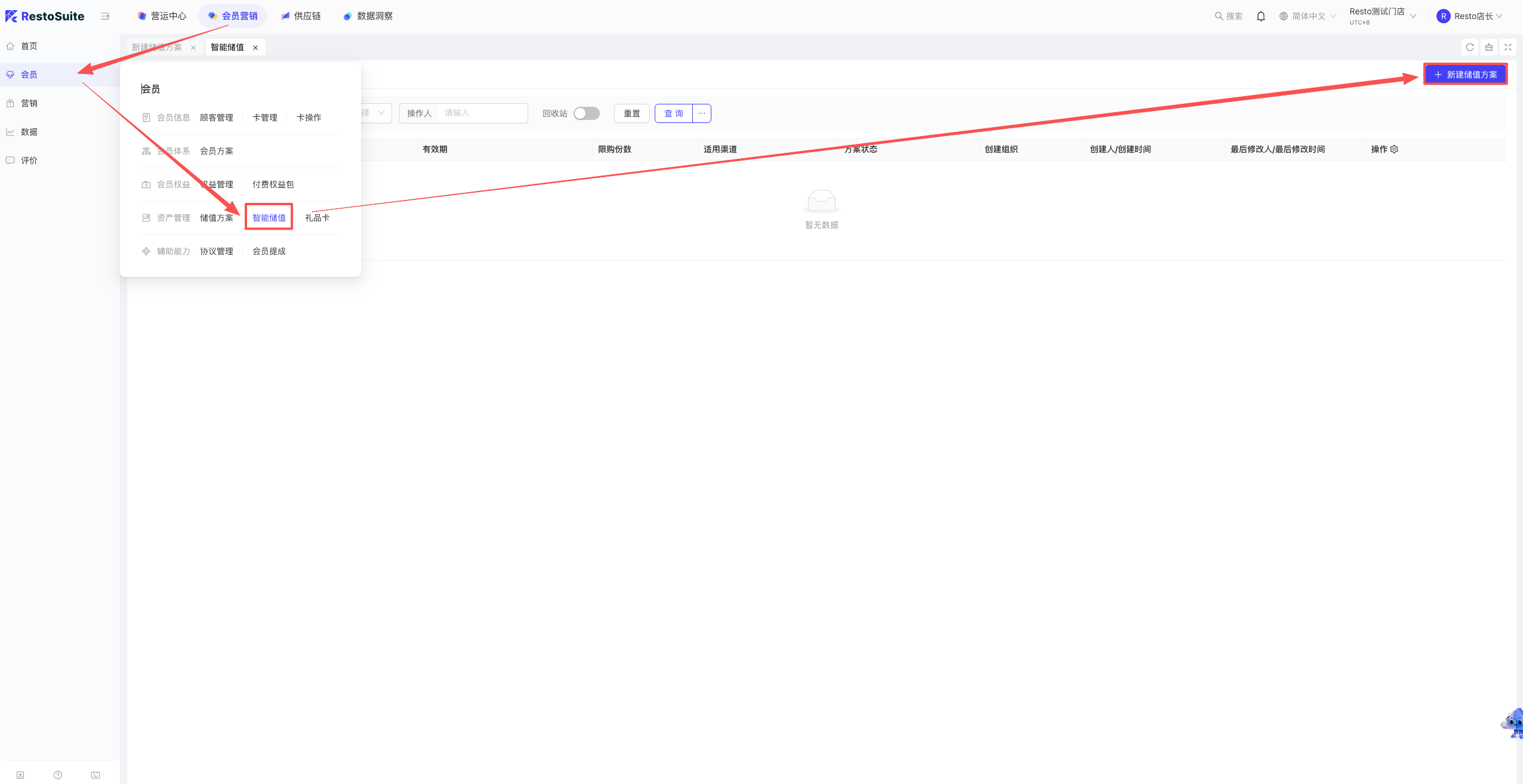
- Information to Fill: Name, validity, applicable stores, and applicable card levels.
- Top-up Settings: Min trigger amount (will not pop up if the pending amount is lower), Tier Type (discount, gift, fixed amount), Tier Rules (multiplier or percentage), and Round-up precision (0.1/1/10/100).
- Limits: Total inventory, applicable channels (POS/Online).
14 How to view the top-up balance of all members?
A: Log into the BO system -> corresponding perspective -> Membership Marketing -> Data (left menu) -> Member Analysis.
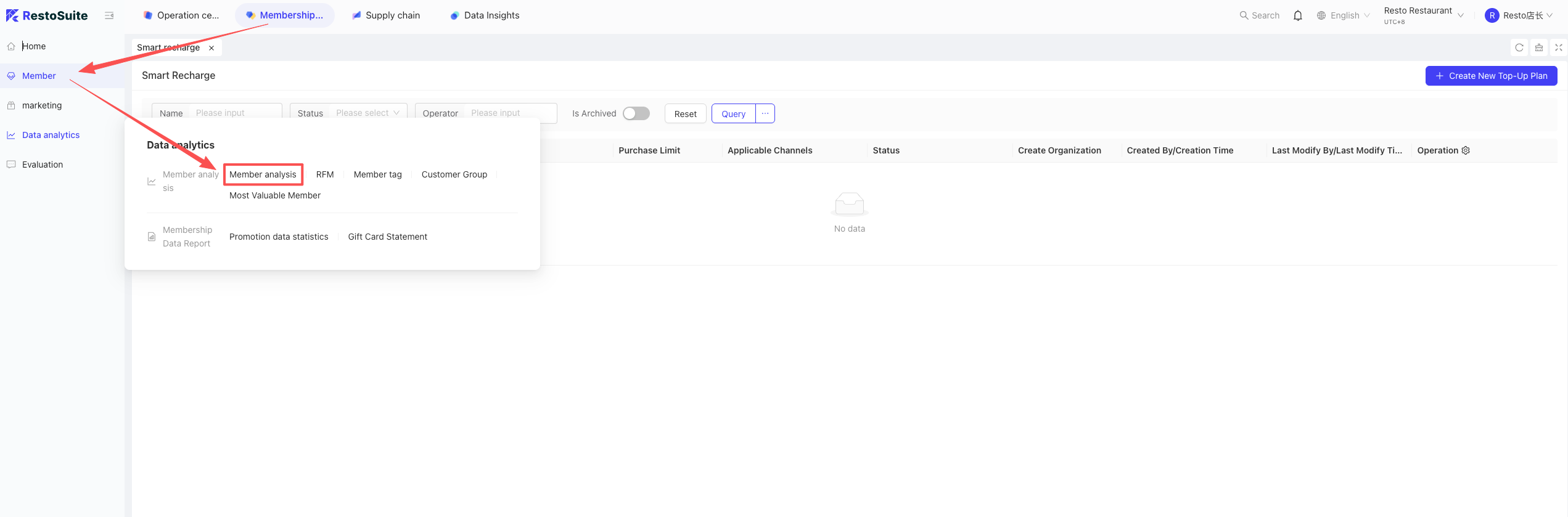
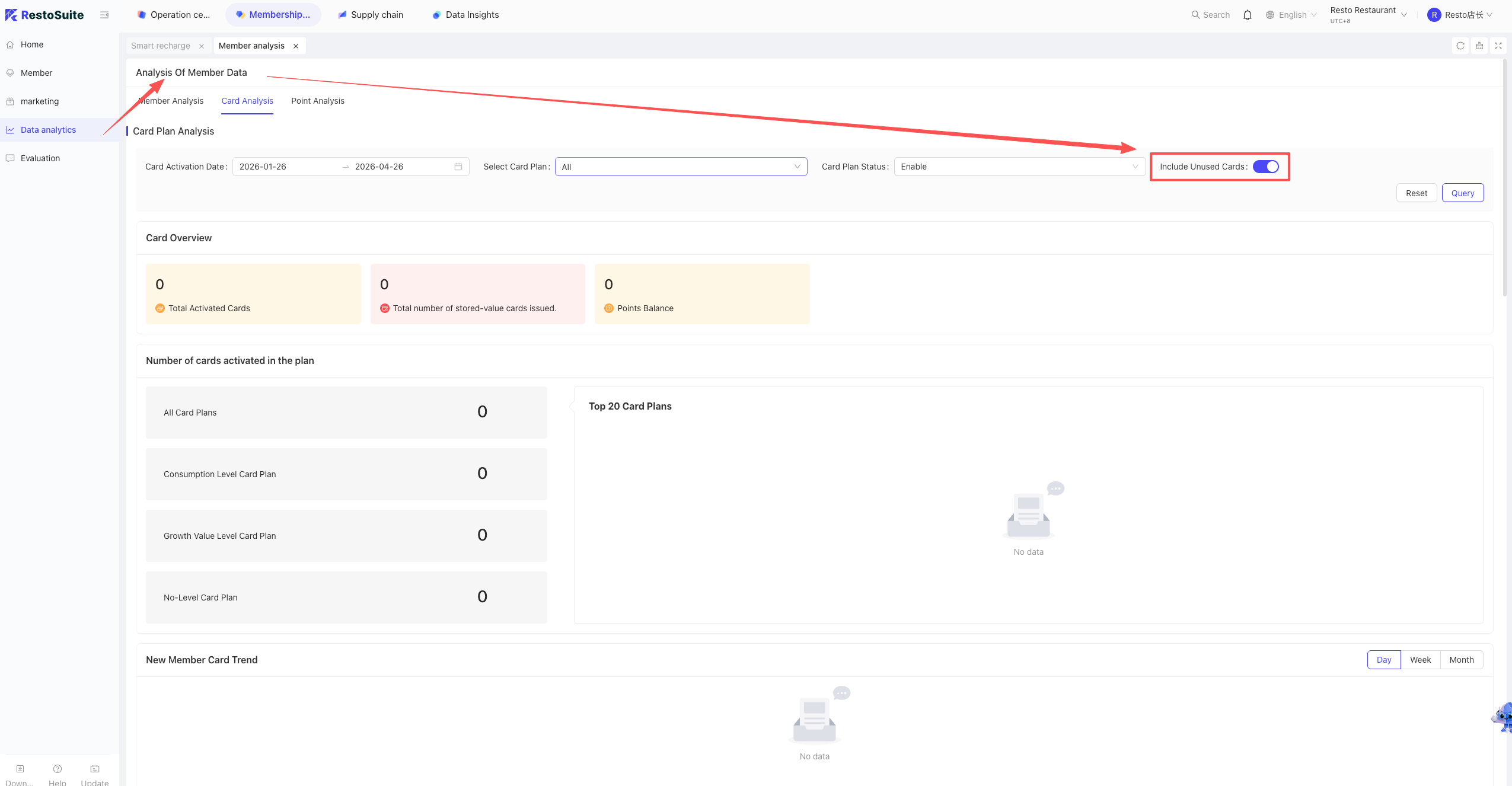
Enter the Member Analysis page, click Card Analysis, and turn on the parameter “Include unspent cards”.
15 How to set whether a fixed password or an SMS verification code is used for membership card consumption?
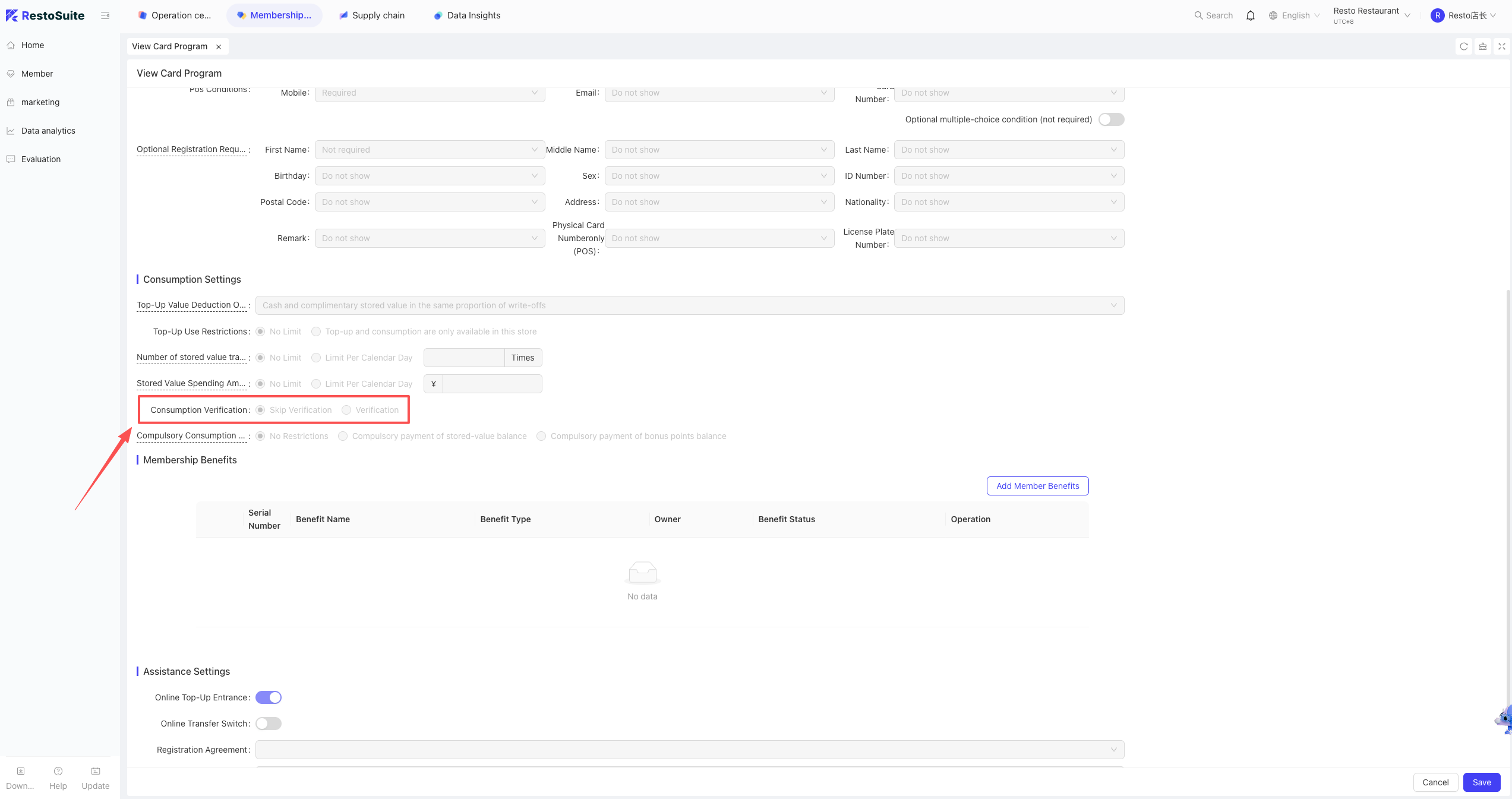
A: Log into the BO system -> Membership Marketing -> Member (left menu) -> Membership Scheme. Edit the corresponding scheme to enter the settings interface.
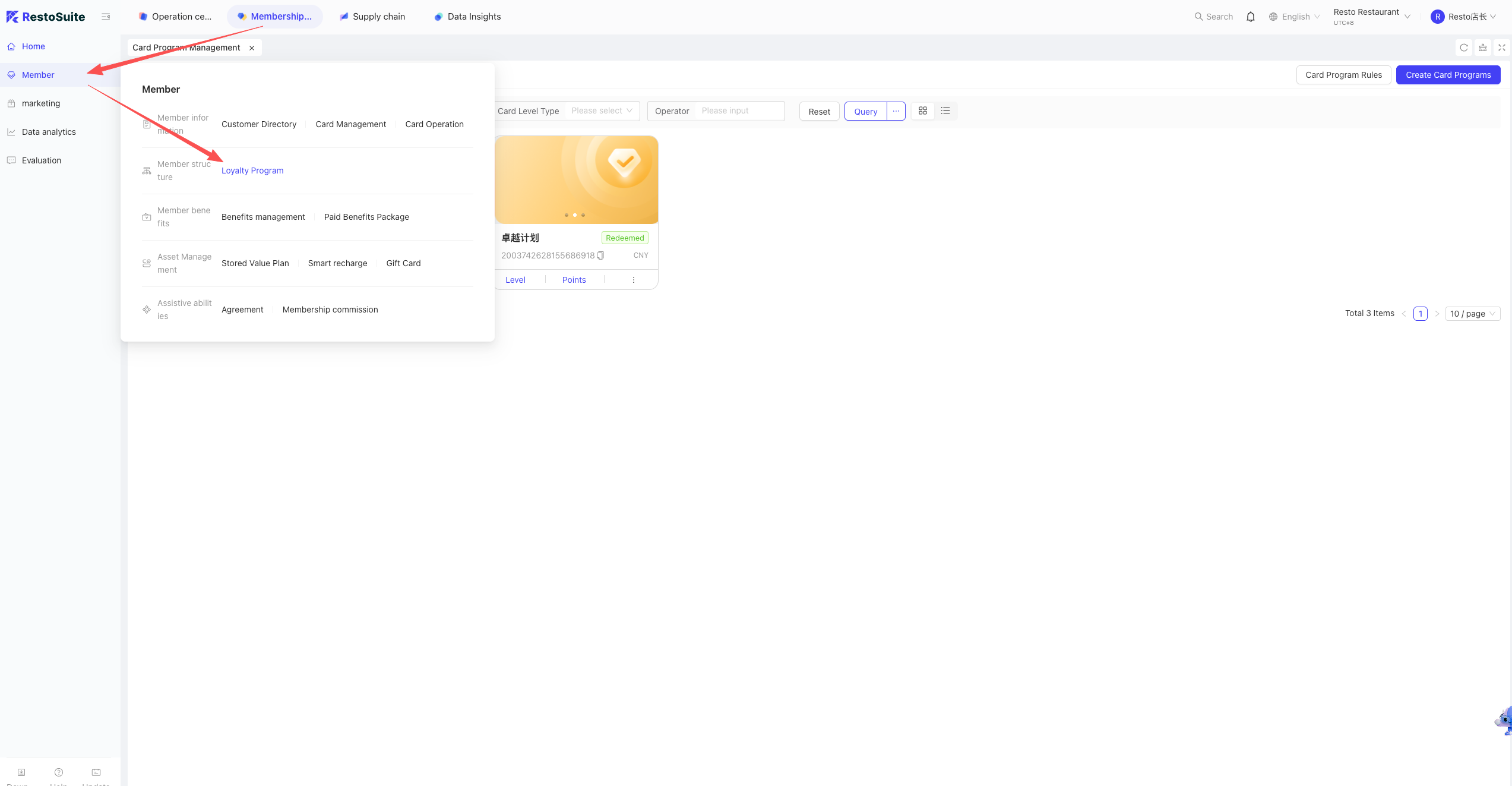
Find Consumption Settings -> Consumption Verification, check the box to Verify/Do not verify, and select the verification method.
16 What is the maximum update delay after creating a member tag?
A: The maximum delay is D+1 days.
17 In what time zone is the marketing event effective time calculated?
A: It is based on the time zone of the browser terminal where the event was created.
18 Do stamp events support item-level settings?
A: No, item-level settings are not supported.
19 Can a top-up package be restricted so that top-up AND consumption can only happen at one specific store?
A: You cannot restrict the top-up package directly; however, you can achieve this indirectly by restricting the applicable stores on the membership card scheme itself.
20 What is the difference between “Recruitment Store” and “Card Issuing Store” when creating member segments? ”
A: Recruitment” targets the Person, while “Card Issuing” targets the Card.
21 During batch top-ups in Card Operations, a payment method was selected, but it doesn’t show up in the Top-up Statistics Report.
A: This is the current system logic.
22 For Douyin Group Buys, can one Douyin Local Life package be bound to multiple RestoSuite combos?
A: Yes. In the Douyin Local Life item ID field, input multiple RestoSuite item codes separated by English commas.
Note: Supports a maximum of 100 characters.
23 After a marketing event is created, can the “Only as Member Benefit” parameter be modified?
A: No, it cannot be modified. You must delete and recreate the event.
24 If the mass SMS account balance is insufficient and only sent to a portion of the segment, can the failed ones be resent with one click?
A: Currently unsupported. You need to manually export the failed recipients, create a new segment with them, and send the SMS again.
25 Can member points accumulation be controlled by the checkout method?
A: Yes, it is controlled by whether the payment method is recorded as “Net Receipt” (实收). Only accounting subjects marked as “Net Receipt” will participate in points accumulation.
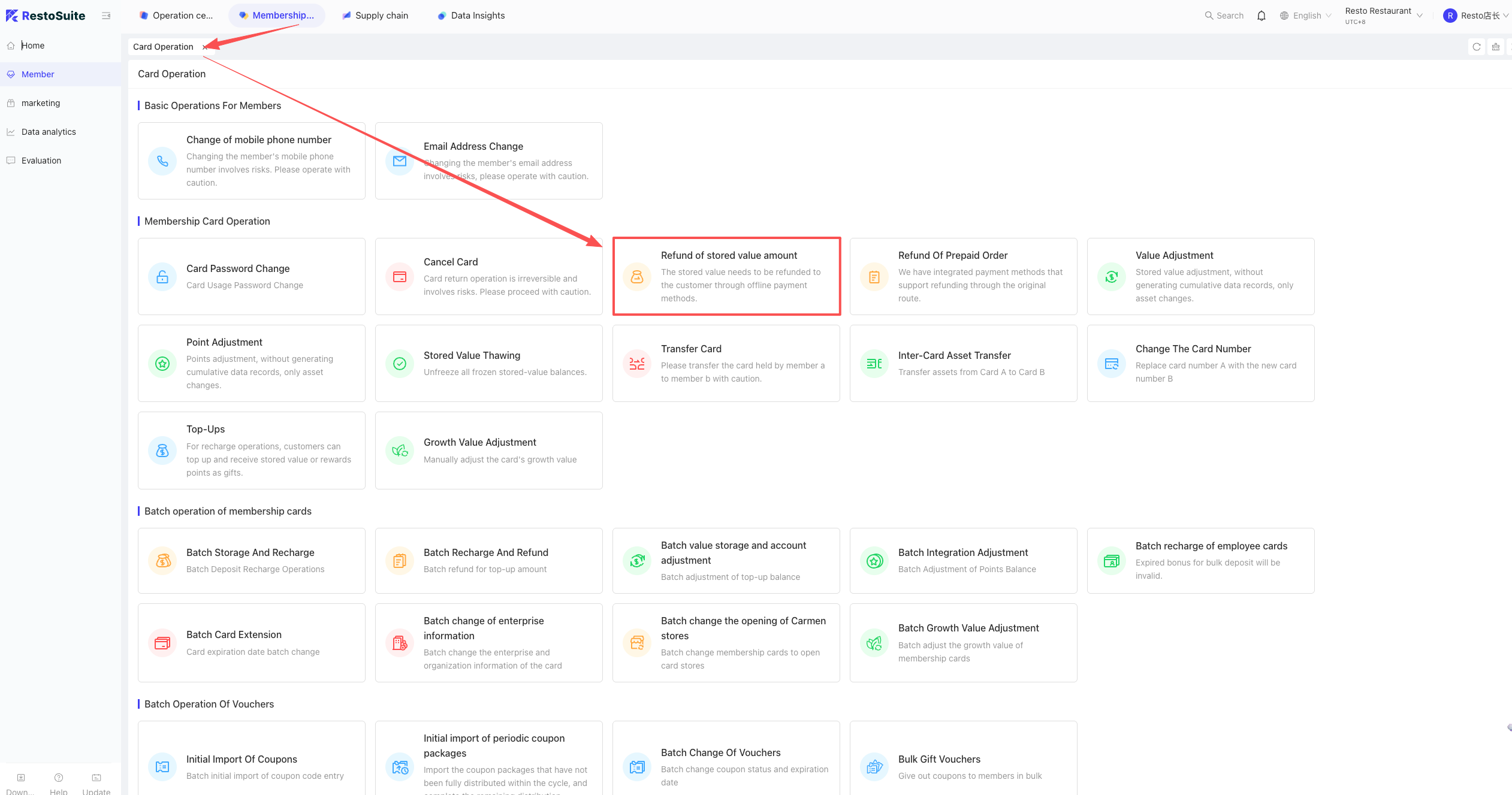
26 Do member top-up order refunds support partial refunds?
A: Partial refunds are not supported.
Note:
Once the top-up balance has fluctuated (e.g., consumed and then the consumption was voided), "Original Route Refund" (refunding directly back to the payment card) is no longer supported.
27 How to edit a published Paid Benefit Package?
A: You must take it down first. After unpublishing, the “Edit” button will appear.
28 How to charge a fee for opening a membership card?
A: Charging a direct “card issuance fee” is not supported. You can only achieve this by requiring customers to purchase a paid coupon pack or a paid benefit pack to join.
29 Are the points rules in the membership scheme calculated based on the Net Paid Amount or the Payable Amount?
A: They are calculated based on the Net Paid Amount.
30 When integrating with Meituan Group Buy, must the Meituan industry be set to Food & Beverage?
A: Yes. If it is a non-F&B industry, the system cannot integrate with it.
31 How to troubleshoot when members registered via the Online Mini-Program do not show a Recruitment Store?
A: After a customer registers online, the recruitment store will only update after their first consumption. It will be recorded as the store where they made their first purchase. Future transactions at other stores will not change this original recruitment store.
32 Why is the filtered member segment count incorrect?
A: If there are newly joined or modified members today, the segment will only capture them the next day. This is independent of whether the segment is newly created; segment filtering relies on member data that currently syncs only once a day (T+1). Today’s changes will sync tomorrow.
33 What is the execution schedule for mass gift events?
A: They are executed every 5 minutes.
34 How to extend the expiration date of member coupons?
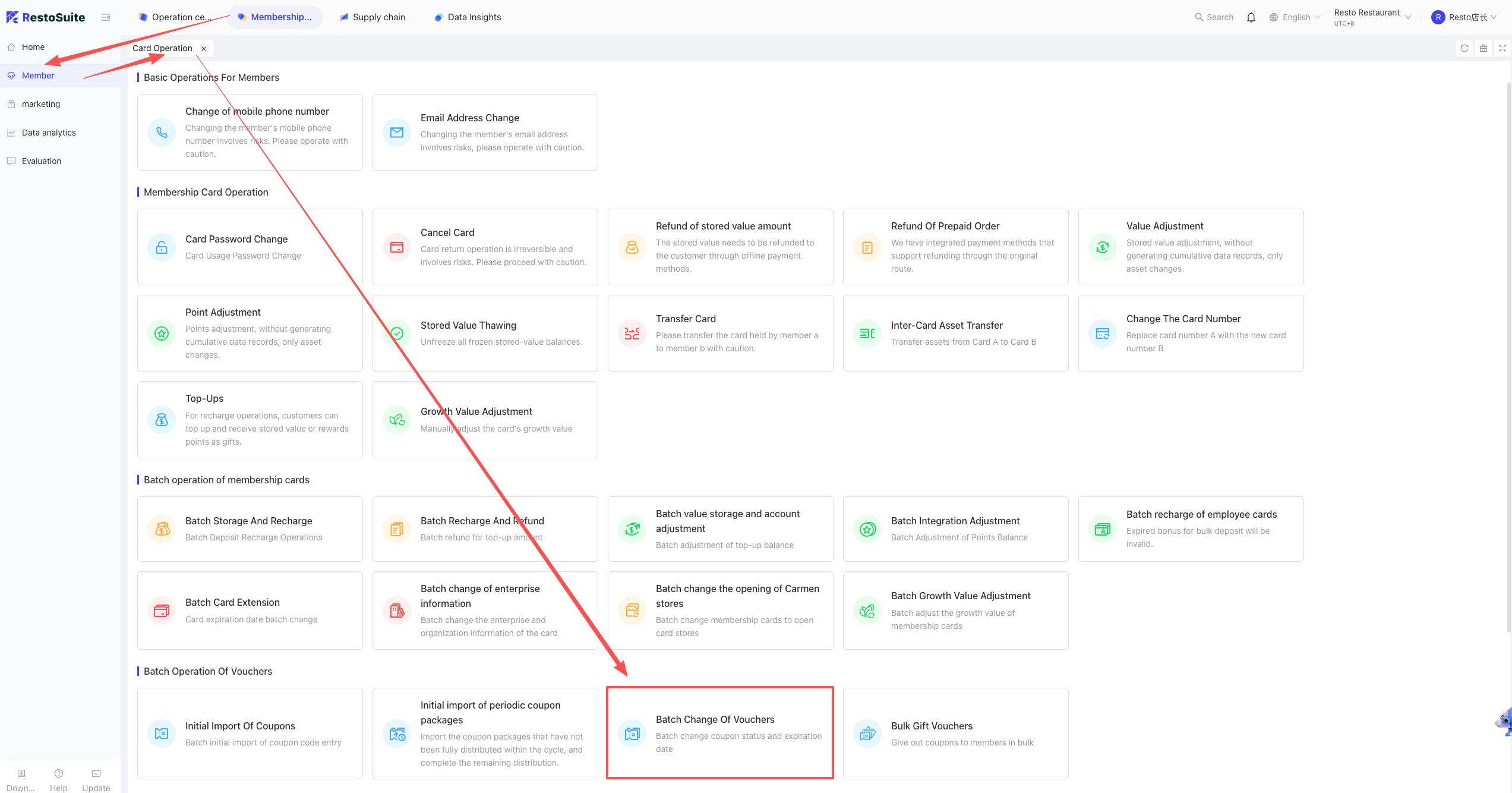
A: Log into the BO -> corresponding perspective -> Membership Marketing -> Member -> Card Operations -> find Batch Change Coupon Attributes.
35 Do “Free Claim” events support giving different coupons to different member levels?
A: This feature is not supported.
36 Does refunding a member top-up support returning funds via the original payment route?
A: If you need original route refunding, you MUST use “Top-up Order Refund” in Card Operations. If you use other refund methods, the original route return is impossible.
Note:
If you use another method to refund and then manually adjust the balance back to the original amount, using "Top-up Order Refund" afterward will still fail to return funds via the original route.
37 Can a single store have multiple “Custom Top-up” schemes?
A: No, a single store can only have one Custom Top-up scheme at a time.
38 When setting up a marketing event in the BO backend, it won’t save after selecting the Membership Scheme. How to fix this?
Cause: The selected membership scheme does not have any member levels created under it yet.
39 Does the overseas version of Membership Marketing support transferring coupons?
A: No, gifting is not supported. Only the domestic (China) Mini-program supports the coupon gifting feature.
40 Can member point deductions be set to have “no maximum deduction limit” for just one specific day?
A: This logic setting is not supported.
41 Can the “Gift Value” on a Gift Card be manually inputted?
A: No, it cannot be inputted. It is automatically calculated via: Face Value - Cash Value = Gift Value.
Example: Face Value is 120, Cash Value is 100. The Gift Value will automatically show as 20.
42 Do taxes earn member consumption points?
A: No, the tax portion of the bill does not participate in points calculation.
43 Can coupons and top-up balances be set so they cannot be used together?
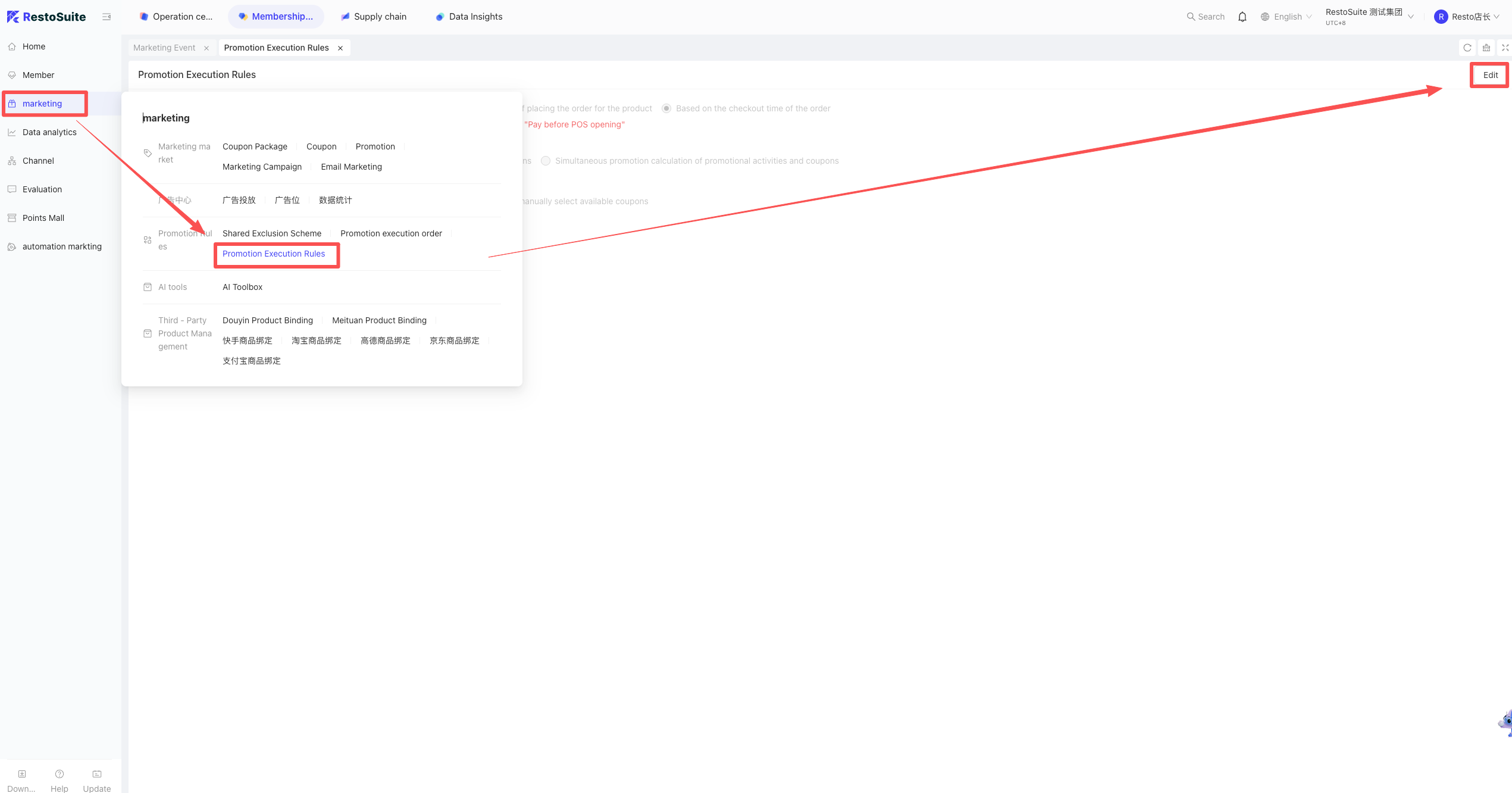
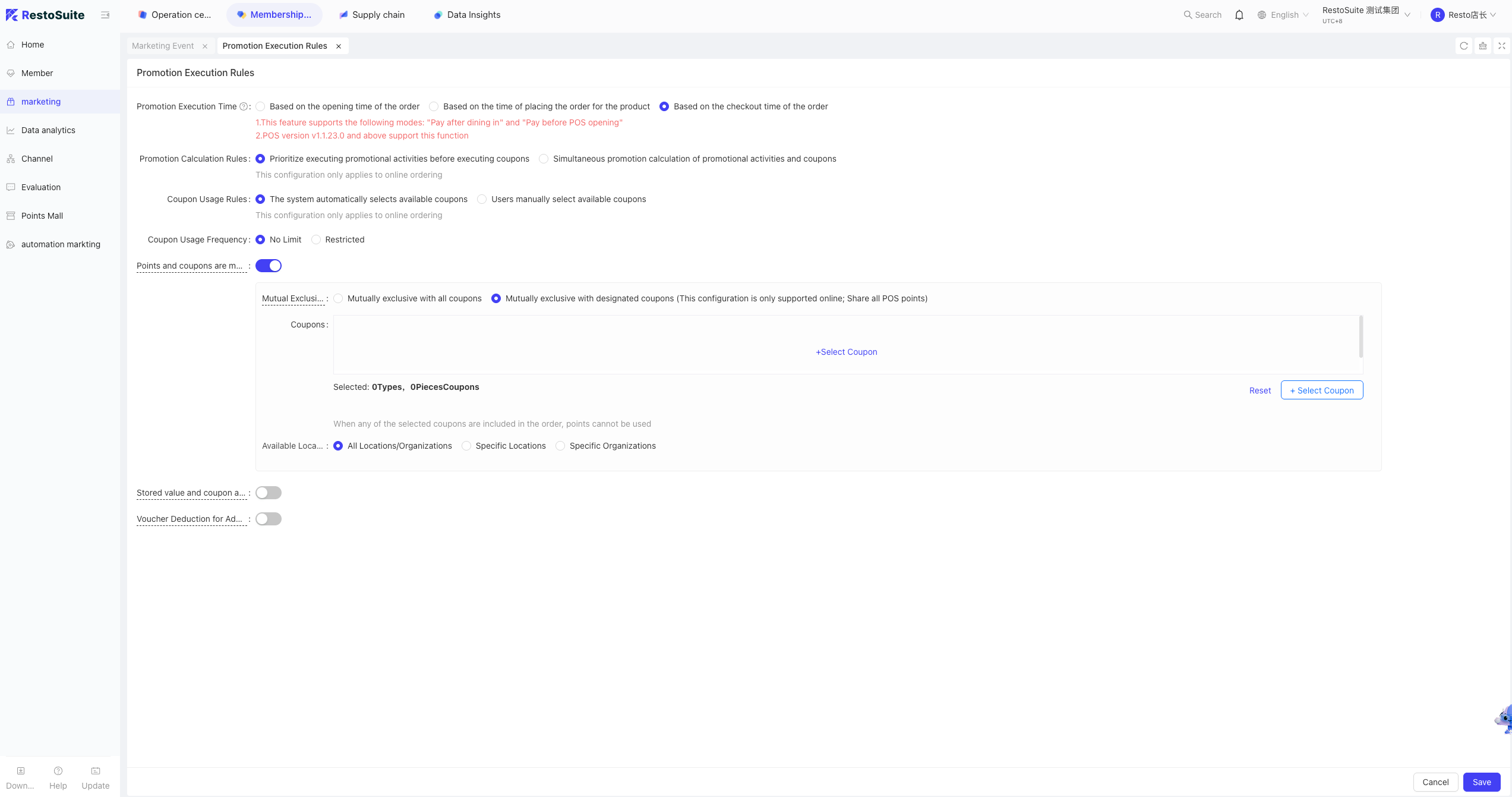
A: Yes. BO Backend -> Membership Marketing -> Marketing -> Promotion Execution Rules, where you can set Top-up and Coupons to be mutually exclusive.
44 How do we set events to be stackable with each other?
There are two ways to achieve this:
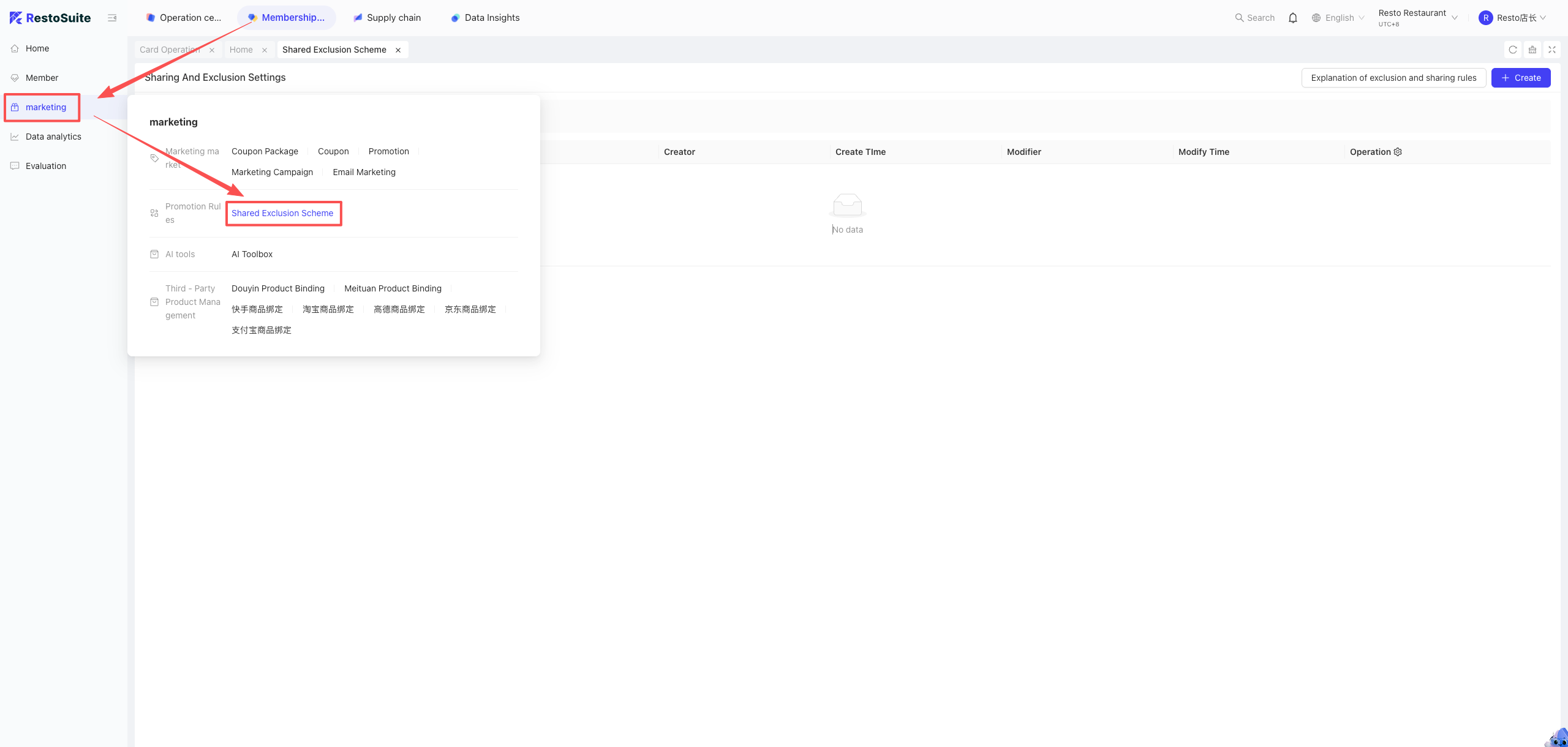
- A: Configure Global Rules: Store/Group perspective -> Membership Marketing -> Marketing -> Share & Mutually Exclusive -> Add/Edit.
- B: Configure Individual Event Rules: Find the specific event, expand “Advanced Settings”. (Note: Individual rules have higher priority than global rules).
Note:
Stacking uses the foundation of sharing rules. If you enable the "stacking" parameter, you don't need to enable "sharing" again, otherwise, it will throw an error when saving.
45 How to set POS events to auto-execute?
There are two ways to achieve this:
- A: Global Auto-Execute Scheme: Group perspective -> Membership Marketing -> Marketing -> Promotion Execution Order -> Auto-execution and its sequence. (Applies globally).
- B: Individual Event Setting: Find the specific event, edit it, and expand “Advanced Settings”.
- Note: Supports multiple promotional events executing together.
46 Can the mutual exclusion between Top-up and Points be set per store or per card scheme?
A: No, this is a global system setting.
47 Is the member QR code on the Mini-Program real-time?
A: Yes, it refreshes every 1 minute for security.
48 Do Item Exchange Coupons and “Discount-to” Coupons only apply to the base price of combo items?
A: If you want them to cover extra add-on prices, go to the coupon’s Advanced Settings and change “Sub-items” and “Side Dishes” to “Participate in discount”.
49 For the “Card Opening Gift” event, why does the Event Details page show “Total Distributed: 0”?
A: The data is updated on a T+1 basis (next day), it is not real-time.
50 Can a Douyin Cash Voucher be used to pay for a member top-up transaction?
A: No.
51 What are the rules for clearing/expiring member points?
- Monthly Clearance: e.g., Points earned on Jan 20, 2025 -> will be cleared on Feb 1, 2026.
- Daily Clearance: e.g., Points earned on Jan 20, 2025 -> will be cleared on Jan 21, 2026.
52 If a member joins via email and later updates their phone number, can SMS verification be skipped?
A: No. SMS verification is mandatory because without verifying the phone number, there is no way to confirm if it is valid.