Profile Completion Gift
1 Module Introduction
The Profile Completion Gift Activity is a key tool for merchants to refine their member management. Members get exclusive gifts for supplementing or completing designated personal information.
This activity incentivises members to submit detailed data (e.g., date of birth, phone number, address) through benefits, helping merchants build comprehensive member profiles and multidimensional customer retention channels. It supports targeted marketing and personalized services, while boosting member engagement and brand loyalty.
2 Configuration Guide
2.1 Accessing the Feature
-
Navigate to the Marketing Management Module
- Log in to the SaaS Admin Portal. Go to【Membership Marketing】>【Marketing】> 【Marketing Activities】.
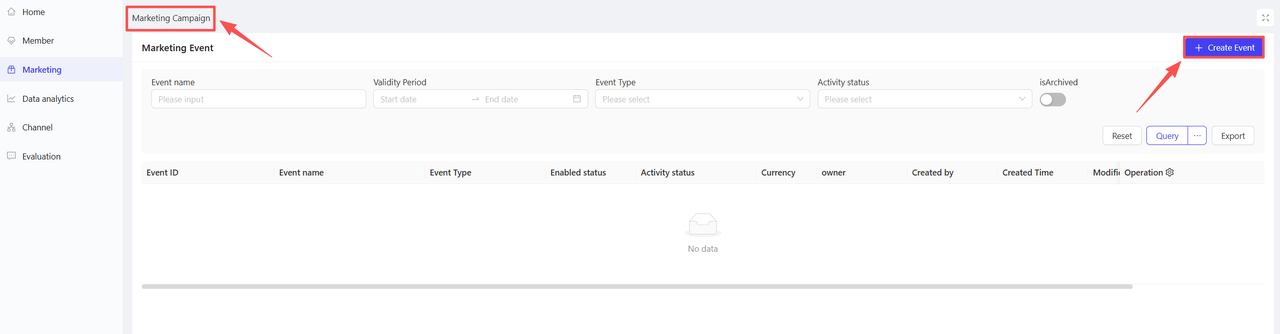
- Log in to the SaaS Admin Portal. Go to【Membership Marketing】>【Marketing】> 【Marketing Activities】.
-
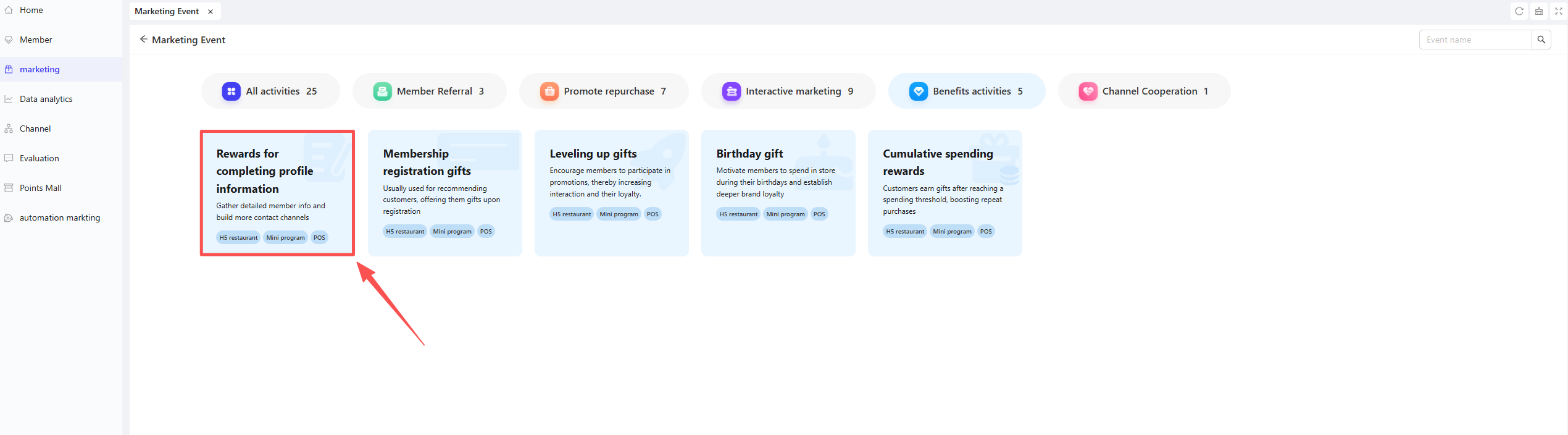
Click【Create Activity】in the upper-right corner. Select the Profile Completion Gift module to enter the configuration page.
2.2 Basic Information Configuration
Fill in the core activity details to ensure clarity for customers and streamline internal tracking.
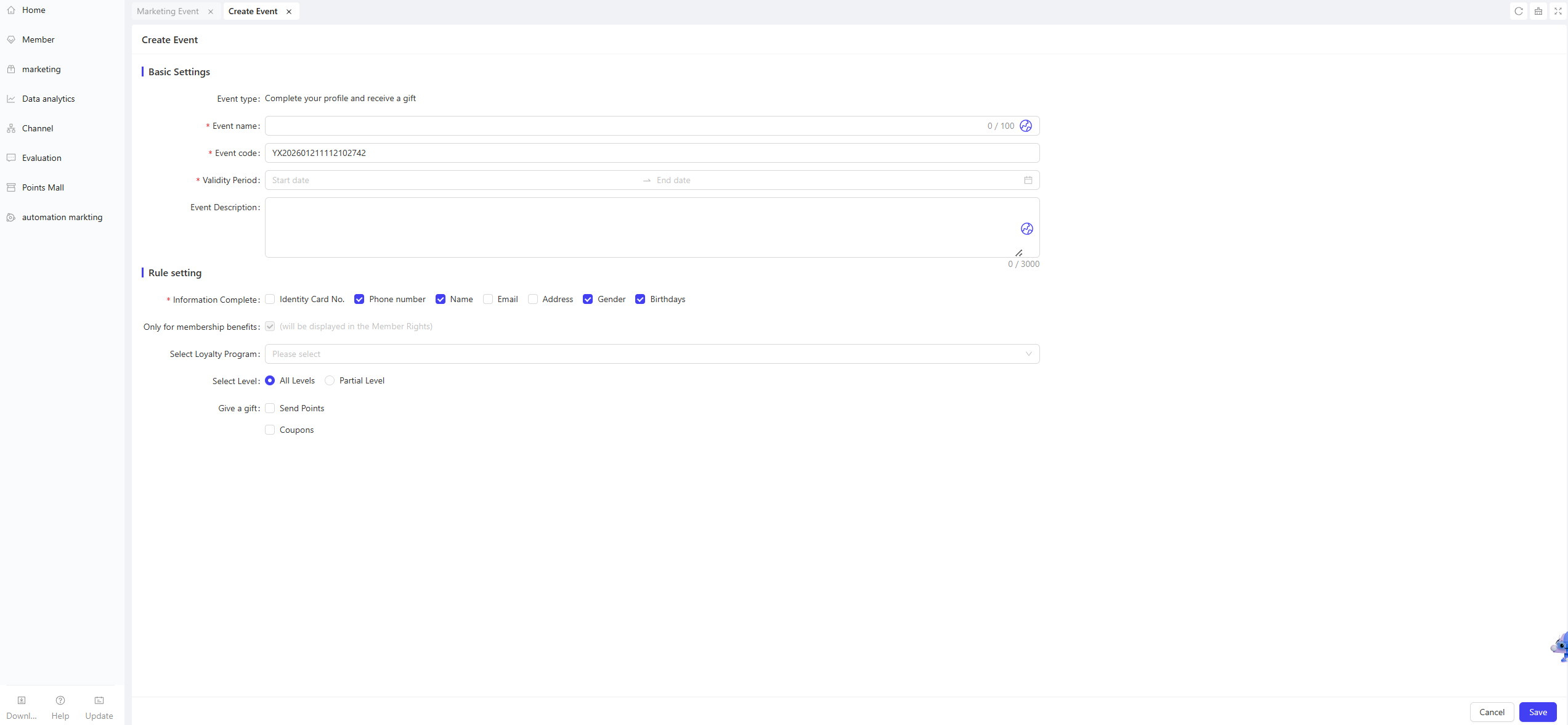
- Activity Name: Required. Choose a name that is easy for customers to identify. (e.g., “Complete Your Profile & Win Gifts!”).
- Activity Code: A unique internal identifier for tracking and reporting.
- Validity Period: Select the start and end dates for the activity.
- Description: Provide clear terms and conditions for the users.
2.3 Rules Configuration
Configure the required profile fields, eligible member scope, and gift types to ensure the activity delivers targeted results.
-
Required Profile Fields Tick the information categories that members need to complete (at least one category must be selected), including: Full Name / Date of Birth / Gender / Address / ID Number / Email Address / Phone Number
-
Select Membership Card Plans Choose the membership card plans applicable to this activity.
-
Select Membership Tiers Choose the membership tiers applicable to this activity. Options: All Tiers or Specific Tiers.
-
Gift Configuration Multiple gift types are supported: Points and Coupons (both can be selected).
- Points: Enter the number of points to be awarded to members.
- Coupons: Add multiple coupons to meet diverse user needs. Configure the following details for each added coupon:
- Gift Name: Select the specific coupon to be offered.
- Gift Quantity: Enter the number of coupons
- Distribution Rule: Set the distribution rule (Instant Distribution / Hourly Delayed Distribution / Daily Delayed Distribution).
- Validity Mode: Select the validity rule for the coupons and complete the configuration:
- Relative Validity: The coupon’s validity period starts from the moment the user claims it.
- Example: “Valid for 7 days after claiming”
- Fixed Validity: The coupon is valid only during a preset time window, regardless of the user’s claim time.
- Example: “Valid from 00:00:00 on November 1, 2024, to 23:59:59 on November 11, 2024”
- Relative Validity: The coupon’s validity period starts from the moment the user claims it.
3 Activity Activation & Management
-
Activating the Activity
- After completing all configurations, click Save to launch the activity immediately.
-
Activity Management & Monitoring
- View activity performance data (including order volume and participant metrics) on the Activity Management page.
- Pause, adjust, or archive the activity at any time as needed.

4 User Journey (End-User Experience)
Core Flow:
Member Accesses Activity Page → Views Required Profile Fields → Supplements/Edits Profile Information → Submits and Passes Verification → Claims Gift → Views Gift Details