Birthday Gift
1 Module Introduction
The Birthday Gift Activity is an emotional marketing tool for member-targeted merchants. Its core mechanism is that exclusive gifts are automatically sent to members during their birthday period, including the advance gift window.
Personalized benefits encourage members to visit stores and shop, strengthen the brand-member emotional bond, build deeper loyalty, and boost repurchase rates and consumption stickiness.
2 Configuration Guide
2.1 Accessing the Feature
- Log in to the SaaS platform backend
- Navigate to【Membership Marketing】>【Marketing】>【Marketing Activities】.
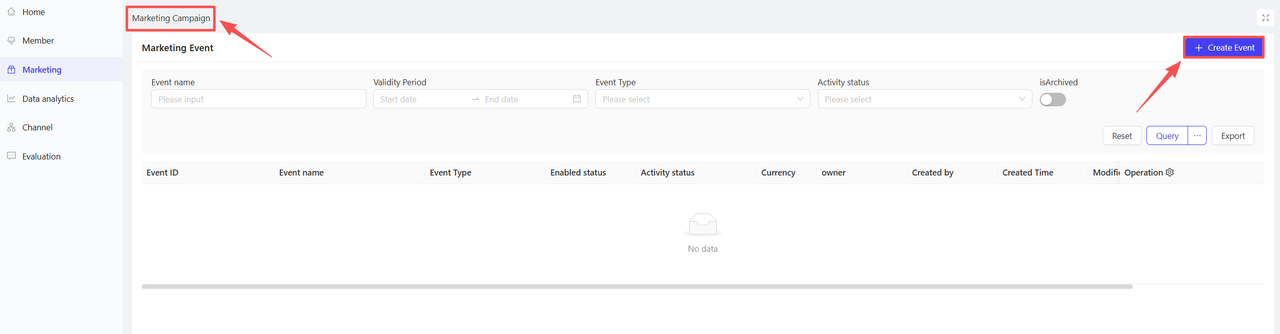
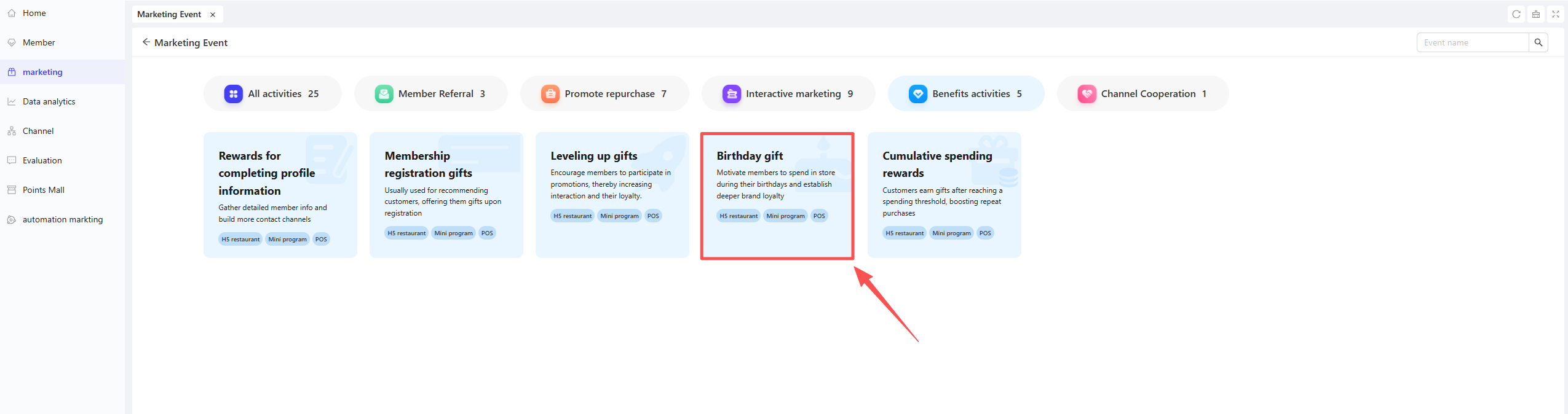
- Click【Create Activity】in the upper-right corner of the page, select the Birthday Gift module.
2.2 Basic Information Configuration
Fill in the core activity details to ensure clarity for customers and streamline internal tracking.
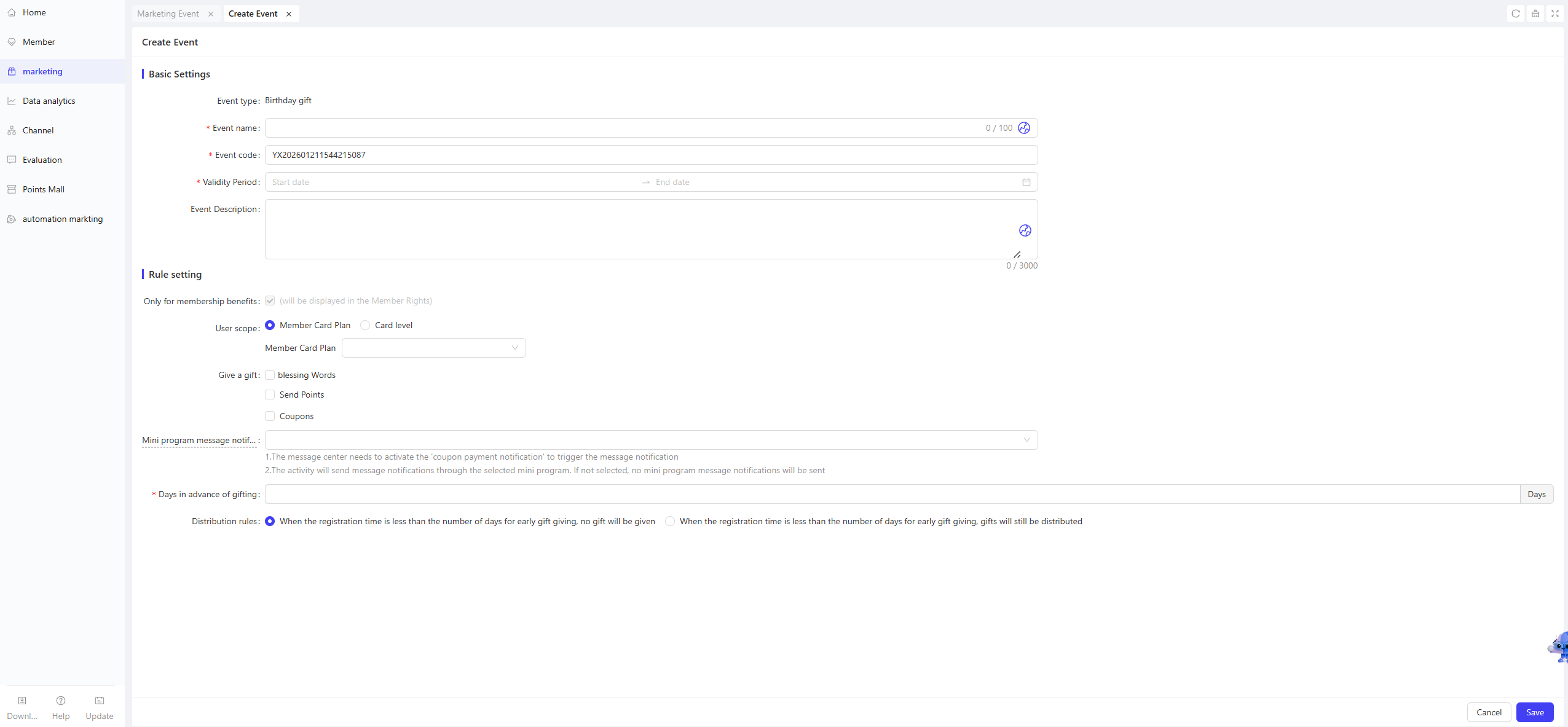
- Activity Name: Required. Choose a name that is easy for customers to identify. (e.g., “Get Gifts on Your Birthday!”).
- Activity Code: A unique internal identifier for tracking and reporting.
- Validity Period: Select the start and end dates for the activity.
- Description: Briefly outline the activity details and rules for clarity.
2.3 Rules Configuration
-
User Scope: Select the specific scope of users eligible for the activity based on the following two dimensions:
- Membership Card Program: Filter users based on one or multiple membership card programs.
- Membership Card Tier: Filter users according to different card tiers under the selected membership card program(s).
-
Gift Selection: You can choose the following three types of gifts, with multiple selections allowed:
- Birthday Greeting: After selecting this option, enter a customized birthday message in the text box (Example: “Dear Member, Happy Birthday!”)
- Points: Set the number of points to be awarded, then select the point distribution rule: Instant Distribution / Hourly Distribution / Daily Distribution.
- Coupons: Add multiple types of coupons to meet diverse user needs. For each added coupon, you need to configure the following details:
- Gift Name: Select the specific coupon here.
- Gift Quantity: Enter the number of coupons to be provided.
- Effective Method: Choose between the Relative Validity Period or Fixed Validity Period, then complete the configuration:
- Relative Validity Period: The validity period starts counting from the moment the user claims the coupon.
- Example: “Valid for 7 days after claiming”
- Fixed Validity Period: The coupon is valid within a fixed time frame, independent of the user’s claim time.
- Example: “Valid from 00:00:00 on November 01, 2024, to 23:59:59 on November 11, 2024”
- Relative Validity Period: The validity period starts counting from the moment the user claims the coupon.
-
Mini Program Notification: Select the Coupon Arrival Notification content for the mini program here.
Notes
The Coupon Arrival Notification must be enabled in the Message Centre to trigger message alerts.
Notifications are sent via the selected mini program; no notifications will be sent if no mini program is selected.
- Advance Gift-Giving Days (Required Field):
Set the number of days before a member’s birthday when they can claim birthday gifts (e.g., 3 days, 7 days). This extends the gift usage period, allowing members ample time to visit stores and make purchases.
- Example: If set to 3 advance gift-giving days, a member whose birthday falls on October 10 can receive and use the gift starting from October 7.
Distribution Rules:
-
Option 1: No Gift Distribution if Membership Registration Duration is Shorter than Advance Gift-Giving Days
- Rule Explanation: If a member’s registration duration is less than the set advance gift-giving days (e.g., 3 advance days are set, but the member registered only 2 days before their birthday), the birthday gift will not be distributed this time.
- Applicable Scenario: More suitable for rewarding long-term loyal members, ensuring gifts are accurately delivered to high-stickiness users and improving consumption conversion efficiency.
-
Option 2: Gift Distribution Regardless of Membership Registration Duration
- Rule Explanation: All members can normally claim birthday gifts once they enter the birthday gift-giving window, regardless of how long they have been registered.
- Applicable Scenario: Ideal for sending birthday care to newly registered members, quickly building rapport, increasing new customer retention, and covering a broader member base.
3 Activity Activation & Management
-
Activating the Activity
- After completing all configurations, click Save to launch the activity immediately.
-
Activity Management & Monitoring
- View activity performance data (including order volume and participation metrics) on the Activity Management page.
- Pause, adjust, or archive the activity at any time as needed.
