Promotion
1 Introduction
This guide covers promotion execution and coupon redemption in the POS system, including discount types, execution order, redemption rules, and key considerations for accurate revenue tracking.
2 Basics of Promotions and Discounts
2.1 Key Types of Discounts
Promotions: Includes discounts like buy-one-get-one-free, percentage off, special pricing, add-on deals, combo discounts, discounts on the Nth item, and gifts.
Coupons: Platform coupons (group purchase, cash vouchers), member coupons, third-party coupons, and custom coupons.
Local Discounts: Local free items, price adjustments, store-set discounts.
2.2 Core Rules
-
Priority Principle:
- Local free items, price adjustments > Promotions > Local discounts (execute in this order when recalculating discounts)
-
Stacking Limits:
- No stacking discounts (platform coupons cannot be combined with store discounts or promotions on the same item)
-
Execution Method:
- Online restaurant promotions automatically execute in the set order
- Offline POS supports automatic execution if selected
3 Promotion Execution Order
3.1 Order Configuration
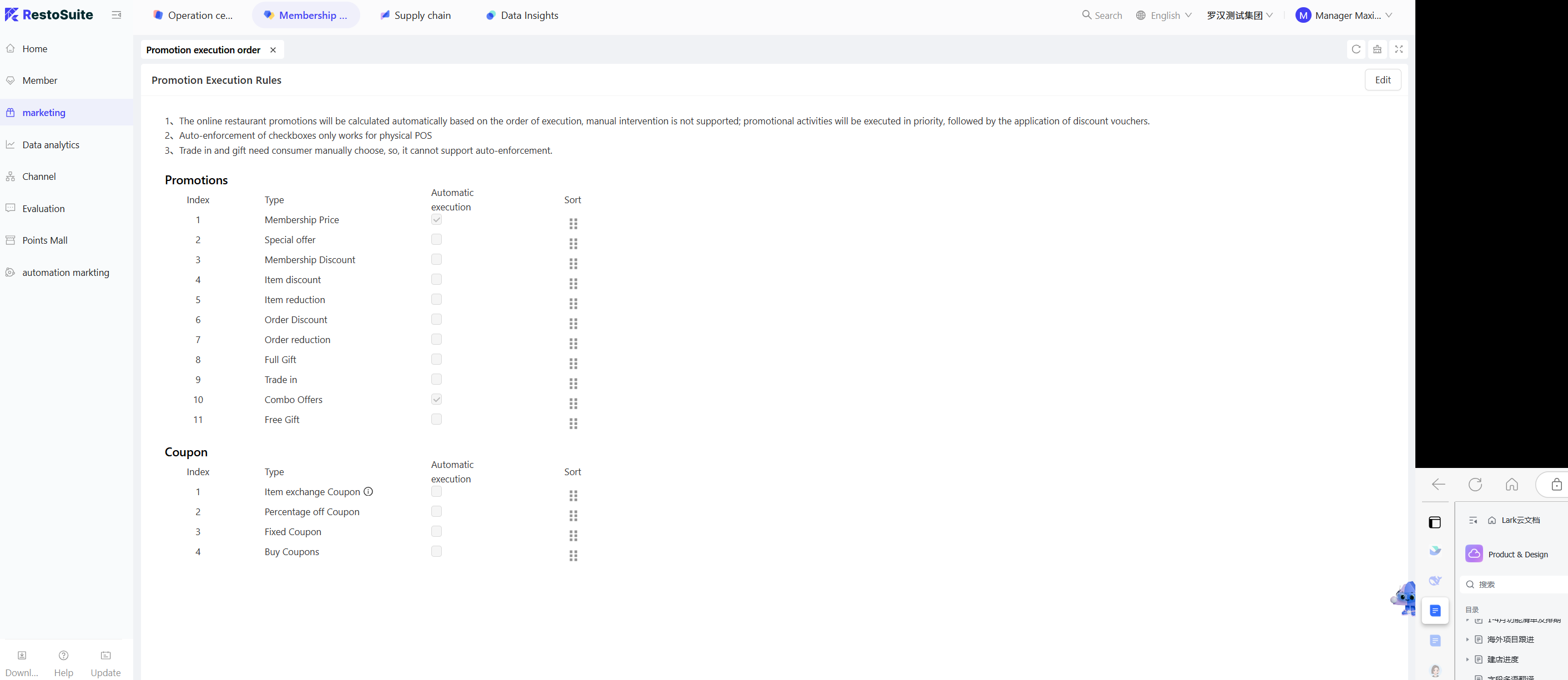
- Log in to the BO end, go to【Marketing → Promotions Management → Promotion Execution Order Settings】
- Set the execution order for【Promotions】and【Coupons】separately, adjust the sequence number, and select whether to auto-execute (only effective for offline POS).
3.2 Default Execution Order (Customizable)
Category | Default Execution Order | Key Notes |
|---|---|---|
Promotions |
| Execute in sequence number order, applicable promotions activate automatically |
Coupons |
| Sort and execute independently from promotions |
3.3 Effective Rules
- Online Orders: Automatically execute in the set order, no manual adjustment allowed.
- Offline POS Orders: If “Auto-Execute” is checked, promotions activate in order; if not, corresponding discounts must be manually triggered.
4 Coupon Redemption and Coordination with Promotions & Discounts
4.1 Redeem Coupon First, Then Promotions/Discounts
4.1.1 Coupon First, Then Present/Adjust Price
- Applicable items of the coupon: Free item and price adjustment buttons are disabled; local free items or price adjustments cannot be executed.
- Non-applicable items: Free items or price adjustments can be executed normally; if the cash voucher has no applicable items, the discount amount will be adjusted automatically after redemption.
4.1.2 Coupon First, Then Promotions
- Platform coupons with applicable items: These items do not participate in any promotions (e.g., discounts or price reductions).
- Platform coupons with no applicable items: All items can participate in promotions, and the cash voucher discount amount will be adjusted accordingly after applying for the promotional discount.
4.1.3 Coupon First, Then Local Discounts
- Platform/Member coupons with applicable items: These items will not receive local discounts; they are excluded from discount calculations.
- Platform/Member coupons with no applicable items: Local discounts can be applied normally.
- Member discount coupons: Same logic as local discounts; if applicable items overlap with redeemed coupon items, discounts are not applied.
- Third-party coupons: Follow platform coupon logic
- Custom coupons: No limitations, can be freely combined.
4.2 Promotions/Discounts First, Then Redeem Coupon
4.2.1 Present/Adjust Price First, Then Coupon
- Applicable items of the coupon: If Present or Adjust Price have been applied, the coupon cannot be redeemed; a prompt will appear indicating “Promotion executed, cancel before redeeming coupon”.
- Non-applicable items: Coupons can be redeemed normally without affecting discount validity.
4.2.2 Promotions First, Then Coupon
- After executing a promotion, coupon discount amounts are calculated based on the discounted price.
- If recalculating marketing discounts changes applicable item prices, the coupon discount amount will also adjust.
4.2.3 Local Discounts First, Then Coupon
-
Platform/Member/Third-party coupons:
- Applicable items: If local discounts have been applied, the coupon cannot be redeemed; a prompt will appear indicating “Discount executed, cancel before redeeming coupon”.
- Non-applicable items: Discounts remain valid; coupons deduct from the discounted price, and coupon discount amounts adjust if discount amounts change.
-
Custom coupons: No restrictions, can be redeemed normally.
5 Key Coupon Redemption Rules
5.1 Group Purchase Coupons
- Execution Priority: Execute first, deduct from the original price of items.
- Stacking Limits: Cannot be combined with local discounts or promotions on the same item.
Note: If new items are added after redeeming the coupon, they may not be discounted; you may need to redeem the coupon again.
5.2 Cash Vouchers
- Execution Priority: Execute last, deduct from the total discounted price of items.
- Stacking Rules: Can be combined with promotions (deduct the remaining amount after executing promotions based on priority)
Note: If all applicable items are free items, the coupon discount amount is zero, and the coupon must be manually removed to close the bill.
5.3 Member Coupons
- Applicable Rules: Member coupons with conditions do not apply to local discounts.
- Stacking Limits: No repeated discounts if applicable items overlap with platform coupons.
- Redemption Logic: Redeem according to the coupon’s applicable range, and deduct amounts based on rules (original or discounted prices).
6 Common Operational Tips
When deleting a coupon with applicable items:
If items are covered by platform/member coupons, delete the coupon before deleting items; otherwise, an operation restriction prompt will appear.
Add items after coupon redemption:
If new items need to use the original coupon, the coupon must be redeemed again to take effect.
Custom coupon special rules:
No stacking limits, can be freely combined with local discounts and promotions (manual control of rationality required).
Third-party coupons:
Follow platform coupon logic; cannot be combined with local discounts for the same item.
7 FAQs
-
Scenario: Coupon redemption prompts “Promotion/Discount executed”
- Cancel executed promotion or local discount
- Redeem the coupon again
- If cancellation isn’t needed, use a non-conflicting coupon
-
Scenario: Coupon discount amount is 0
- Check if coupon applicable items are all free/price-adjusted
- Manually remove the coupon
- Choose an applicable coupon or proceed to checkout
-
Scenario: Promotion not automatically applied
- Check if “Auto-Execute” is selected on the backend (offline POS only)
- Confirm items meet promotion conditions (like minimum spend or eligible products)
- Manually trigger promotion
-
Scenario: Duplicate discounts on the same item
- Verify discount types (check if the platform coupon and local discount apply to the same item)
- Cancel one of the discounts
- Keep the appropriate discount based on priority
8 Need Help?
- Creation and editing of promotions and coupons must be done at the BO end; POS only supports execution and redemption.
- If you encounter issues not mentioned here, go to【Settings → Help Center】for video tutorials or contact your store manager.